Disaster Recovery Architecture with Veeam
Outline
This document will go over a recommended two-site disaster recovery design for OpenNebula protected by Veeam Backup & Replication, with procedures for failover and failback. This design assumes an active production site (Site A) and a recovery site (Site B), each running its own OpenNebula installation. Single-site high availability is out of scope for this document.
This requires the OpenNebula Enterprise Edition (EE) since this uses the Veeam backup drivers. Please check the Platform Notes for the supported Veeam Backup & Replication version.
This document is written for qcow2/shared file-based NFS datastores so incremental backups are possible, however other datastores may only support full backups.
Limitations
Failover in this situation is more akin to a restore, not a replication cutover, since the entire disk is being copied over. RPO is the backup job interval plus backup copy lag. RTO is the time to rehydrate all protected VM data plus control-plane rebuilding. Workloads requiring faster recovery may need application-level replication instead.
There is not an easy automatic way to perform this operation, so much of this must be done manually.
Architecture
A Veeam server at each site, with a backup copy job moving restore points from Site A to Site B. Site B runs an independent Veeam server that owns the copy target repository. The following diagram shows the general structure of the workflow.
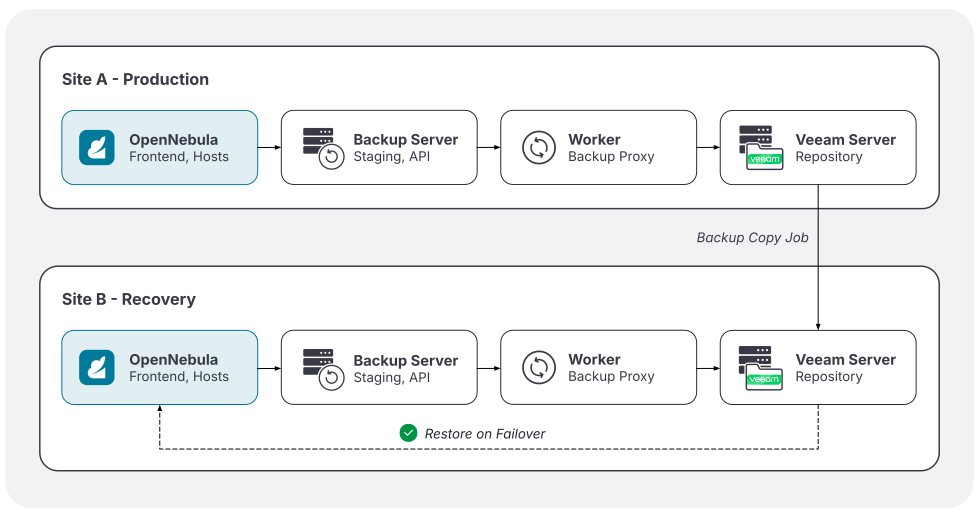
Per-site Components
Both sites need the full OpenNebula and Veeam stack. Site B is a second managed environment, not a storage target.
Backup Server
The backup server Hosts the oVirtAPI server and the OpenNebula backup datastore. Refer to the Veeam Backup & Replication Documentation for distributions and resource requirements.
Backup Datastore
The datastore will be an rsync backup datastore with VEEAM_DS=”YES” in its template, created on the backup server and added to every Cluster you intend to protect.
Worker Appliance
This is deployed into OpenNebula by Veeam when the platform is added as a backup proxy. Refer to our Veeam Backup & Replication Documentation for resource requirements.
Management Network
This must connect the OpenNebula Front-end to the backup server, every KVM Host running protected VMs, the Veeam server, and the worker appliance.
Veeam Server and Repository
Site A backs up locally to its own repository while Site B owns the repository receiving the copies.
Data Path
Disks stage into the OpenNebula backup datastore, are read from there by the worker appliance, then written to the Veeam repository.
- Backup data exists in two places during normal operation. Budget storage for both.
- Clearing the staging datastore resets the backup chain and forces a full download on the next run. Use
backup_clean.rbfor scheduled cleanup, understanding that reclaiming space costs a full backup.
Cross-site Configuration
Configure a backup copy job from the Site A repository to the Site B repository inside of Veeam. It carries the complete chain, including the .vbm metadata file.
Add the Site B repository to the Site B Veeam server. Veeam rescans a repository on addition and then every 24 hours thereafter, cataloguing backups already present on the disk. Copied restore points are therefore visible at Site B with no dependency on Site A surviving.
If a single management console is a hard requirement, the Site B repository can be instead owned by the Site A Veeam server, with the Site A configuration backup stored at Site B and restored onto a standby server during failover. This places a configuration restore inside the RTO and creates a dependency on an artifact from the site that has just failed. This is not the recommended approach, and we suggest separating the management consoles.
Control-plane Objects
Veeam backs up VMs and their disks. OpenNebula strips references to site-specific infrastructure during restore. These objects must exist on Site B before failover can occur.
| Object | Rebinds by | Notes |
|---|---|---|
| Virtual Networks | Restore Parameters | NICs are stripped from the stored definition and attached from the restore request. Networks must exist on Site B and have address ranges to accommodate the restored VMs. Security Groups may also need to be replicated. |
| Users and Groups | Numeric ID | Ownership is preserved with User and Group IDs, so you will need to have these match or manually reassign VMs when restoring. |
| Clusters and Datastores | Name | Match names across sites so restore targeting is scriptable. |
Failover
Manual and decision-driven. Partial automation is possible but not advised. Before starting, confirm Site A is genuinely unavailable and will not return mid-recovery, and have the encryption password available if job encryption is in use.
- Verify the Recovery Point: On the Site B Veeam server, confirm the repository has been rescanned and the expected restore points are present. Check the timestamp of the most recent copied point against the agreed RPO. If it falls short, record the actual data loss position before continuing.
- Confirm Control-plane Readiness: Verify that the Virtual Networks and user/group objects required by the workloads being recovered already exist in Site B. Resolve any gaps before starting restores.
- Restore in Priority Order: Restores are a full data rehydration, so work through workload tiers rather than restoring everything at once. For each VM, use Entire VM > oVirt KVM from the Backups node: select the restore point, choose the restore mode, specify the target Cluster, select a storage domain, set the VM name, configure network settings, and then record a restore reason. Avoid spaces in VM names.
- Rebind Networking and Security: Confirm each restored VM attached to the intended Virtual Network. A successful power-on does not imply correct network policy.
- Validate: Confirm guest addressing, listening services, and application dependencies. Complete the tier before starting the next.
- Redirect Traffic: Update DNS, load balancer targets, or routing. Account for TTL when estimating time to service restoration.
- Begin Protecting Site B: Once workloads are stable, start backup jobs at Site B to prepare for a future failback.
Failback
Failback is not the reverse of failover, as Site A must receive data that exists only on Site B that was created while the VMs were running there. Site B must therefore be a fully protected environment in its own right, with its own oVirtAPI server, worker appliance, backup jobs, repository capacity, and licensed instances, provisioned in advance.
A restored VM is also a new object as far as Veeam is concerned. The identifier Veeam sees is derived from the OpenNebula VM ID, and the recovery site assigns its own, so the restored VM has no relationship to the chain it came from. Incremental lineage does not survive a failover. The first backup taken at Site B is a full backup, and the first backup taken at Site A after failback is a full backup again. Configure repository capacity and backup windows for two full cycles per round trip.
Before committing to failback, consider whether to promote Site B to primary and rebuild Site A as the new recovery site. This avoids a second full data movement and a second service interruption.
- Restore Site A to a Serviceable State: Rebuild or repair OpenNebula, the backup server, the oVirtAPI service, and the Veeam infrastructure. Verify the control-plane objects exist and match.
- Establish Protection at Site B: Confirm Site B backup jobs are completing. Configure a backup copy job from Site B to the Site A repository.
- Seed the Data: Allow the copy job to run until the Site A repository holds a recent full chain for the workloads being returned. This runs while Site B is still serving production.
- Schedule the Cutover Window: Failback involves planned downtime, unlike the failover it follows. Communicate it to users to minimize disruption.
- Quiesce and take a final backup: Stop the workloads at Site B, take a final backup, and copy it to Site A. The gap between this backup and the last incremental backup is the data divergence window.
- Restore at Site A: Same procedure and sequencing as failover. Restore in priority order, rebind networking and security groups, validate each tier.
- Cut over: Redirect traffic to Site A and confirm services before releasing the change.
- Return to steady state: Re-enable the Site A backup jobs and the Site A to Site B copy job. Idle or decommission the temporary Site B protection jobs. Confirm the first post-failback backup completes.
GIVE FEEDBACK
Was this resource helpful?
Glad to hear it
Sorry to hear that