Disaster Recovery Architecture with NetApp ONTAP
Overview
Disaster Recovery (DR) involves anticipating and designing an adequate response for any situation that prevents the correct functioning of a system within an organization. DR plays a key role in an organization’s business and operations continuity, and is a critical aspect in the planning and maintenance of cloud infrastructure.
A complete DR solution involves two main processes:
- Failover: The process of moving business operations from a primary site which has suffered an outage, to a temporary site designated and preconfigured for such emergencies.
- Failback: The process of moving business operations back to the primary site, after the site’s normal operation has been restored.
This guide intends to provide a comprehensive overview of the architecture and actions necessary to perform Disaster Recovery using a NetApp-backed NFS datastore. Ideally after reviewing this guide you should be able to:
- Configure your own DR Solution
- Design the recovery procedures for failover and failback
- Test the DR Solution
Architecture
The reference architecture used in this guide consists of two OpenNebula Clusters with independent Front-ends, on Site A and Site B.
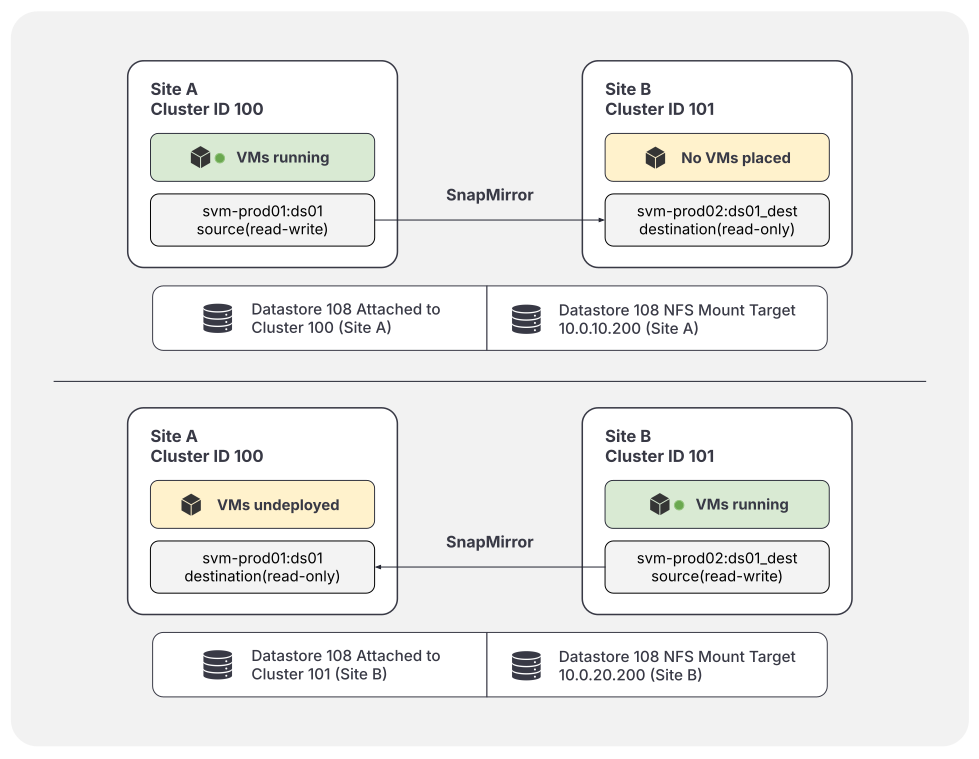
Each site contains an OpenNebula Front-end, three KVM compute nodes, and an independent NetApp ONTAP Cluster with a SnapMirror relationship between them. The Virtual Machines running production workloads reside on Site A. The ONTAP Clusters must be in contact with each other but each site only needs to contact its own ONTAP Cluster
The following diagram shows a basic state of before and after of a Disaster Recovery scenario where a failover has been performed:
Specifications
The setup tested in this reference architecture utilizes the same versions of software components, detailed below, on both sites. Note that the NetApp ONTAP SnapMirror relationship is active between the two ONTAP Clusters.
Site A (source):
- OpenNebula Controller (Front-end)
- OpenNebula 7.4.1
- OS: Ubuntu 24.04
- 3x Compute KVM Nodes
- NetApp ONTAP Cluster serving an NFS mount
- SnapMirror Relationship configured: Version Compatibility Chart
- VMs running production workloads
Site B (destination):
- OpenNebula Controller (Front-end)
- OpenNebula 7.4.1
- OS: Ubuntu 24.04
- 3x Compute KVM Nodes
- NetApp ONTAP Cluster serving an NFS mount
- SnapMirror Relationship configured: Version Compatibility Chart
- VMs running production workloads
Basic Configuration
This guide assumes that the OpenNebula datastores are of qcow2 or Shared types, which are backed by an NFS mount that is served by a NetApp ONTAP Cluster.
To enable the possibility of Disaster Recovery, the ONTAP Volume(s) attached to Site A should be configured to have a SnapMirror relationship to a Site B volume which acts as the destination. Depending on your infrastructure this could be either a synchronous or asynchronous relationship. When using an asynchronous relationship there could be potential data loss if Site A is completely lost without any warning, because they only sync on a specific timer.
There are two configurations to consider with NFS datastores:
One very large volume which contains both the image and system datastores, in which case your mount point would be symlinked to
/var/lib/one/datastores, and this would work fine with this process.Separate volumes and mount points for each image and system data store. This would put your mount points as
/var/lib/one/datastores/0for the system datastore and/var/lib/one/datastores/1for the images datastore. In this configuration you would need to either enableQCOW2\_STANDALONE=”YES”for your datastores, or set up SnapMirror relationships for both of the datastores and perform the failover/failback actions on both of the volumes as well. This is because qcow2/Shared datastores by default will make backing chains with the qcow2 files which means the image datastore is also necessary for running VMs in that configuration.
Enable Mirroring
To enable SnapMirror Relationships follow the guidance in NetApp’s Documentation, or reach out to their technical support for assistance.
The relationship should be created so that Site A is the source and therefore has read-write status. Site B is the destination and will be read-only status. Guidance for verifying the status of your SnapMirror relationships can be found in NetApp’s Documentation.
Failover
There are two cases for Disaster Recovery scenarios: planned and unplanned. There are a few extra steps that can be taken for a planned failover to reduce the amount of data loss. This can be useful if one site is in degraded condition and needs some hardware replacements which would take down the entire network or would pull multiple Hosts offline.
During a planned failover, the main steps that can be taken to prevent data loss are:
- Undeploy/power-off all Virtual Machines
- Run a SnapMirror Resync if the relationship is asynchronous
During an unplanned failover, these steps cannot be taken since that would normally indicate a complete loss of connectivity to Site A.
Beyond this, both situations are effectively equivalent. If possible, fencing should be executed on Site A to ensure that there is nothing actively using the datastore. Then the following actions should be taken:
- Break the SnapMirror Relationship either on the CLI or the ONTAP Web UI so that the destination (Site B) becomes read-write.
- Disable the Hosts in Site A. They may be in error status but disable/offline all of them anyways. This does not perform fencing.
- Attach the datastore to the Cluster for Site B so it can be used at this location.
- Detach the datastore from the Cluster for Site A
- Update the datastore:
- If using NFS Auto Mount, then you’ll need to update the attributes:
- NFS_AUTO_HOST to match the new Cluster
- NFS_AUTO_PATH to match the new volume
- If not using NFS Auto Mount, mount the datastore at the appropriate location in Site B’s Hosts and Front-end, which should be the same filesystem location on Site A. The datastore ID will not change.
- If using NFS Auto Mount, then you’ll need to update the attributes:
- Resume/power-on the Virtual Machines. They should now deploy to the Hosts on Site B using the latest SnapMirror data available.
- Once the Site A NetApp ONTAP Cluster is available again, rebuild the SnapMirror relationship setting Site B as the source (read-write) and Site A as the destination (read-only). This will make Failback much faster.
Failback
The failback scenario is nearly identical to the failover scenario, but reversed. If you were unable to establish the SnapMirror relationship previously, ensure that you do so and that it is in a healthy state for these operations.
The perform the failback you should perform the following:
- Enable Hosts on Site A if you have not already.
- Undeploy/power-off all Virtual Machines.
- Perform a SnapMirror Resync to ensure the data is up-to-date.
- Break the SnapMirror relationship so Site A becomes read-write.
- Attach the datastore back to the Cluster for Site A.
- Detach the datastore from the Cluster for Site B.
- Update the datastore:
- If using NFS Auto Mount, then revert the following to their original values before the failover:
- NFS_AUTO_HOST
- NFS_AUTO_PATH
- If not using NFS auto mount, then ensure the datastore is mounted correctly in your Site A Hosts and Front-end.
- If using NFS Auto Mount, then revert the following to their original values before the failover:
- Resume/power-on the Virtual Machines. They should now deploy to the Hosts on Site A again, using this SnapMirror data.
- Re-establish the SnapMirror relationship to its original state where Site A is the source and Site B is the destination.
GIVE FEEDBACK
Was this resource helpful?
Glad to hear it
Sorry to hear that