What's New
The OpenNebula team is excited to announce the availability of OpenNebula 7.4 “Helix”! This release introduces a broad set of usability, automation, and operational improvements across the platform for operating virtualized infrastructure at scale, led by a redesigned Sunstone interface that makes day-to-day cloud management more modern and intuitive. This release also introduces OneKS Managed Kubernetes and LVM storage as Community Edition features — now available to all OpenNebula users!
Together with this release, OpenNebula also introduces new extension capabilities for advanced infrastructure use cases, including automated AI Factory-scale Bare Metal as a Service with NVIDIA NICo and enhanced Kubernetes provisioning and pre-deployment diagnostics with OneKS. These extensions further expand OpenNebula’s role as a flexible, production-ready platform for private cloud, edge, HPC, and sovereign AI infrastructure.
Key highlights of this release include:
- Redesigned Sunstone interface, delivering a modern, highly intuitive user experience for cloud administrators.
- OneKS Managed Kubernetes is now a Community Edition feature — OpenNebula’s simple, powerful Kubernetes Cluster provisioning and management tool is now available to all users.
- LVM storage is now a Community Edition feature, bringing flexibility such as dynamic resizing and live migration capabilities to all OpenNebula users.
- Improved Kubernetes management with multi-cluster deployment configuration options and pre-deployment diagnostics to validate Cluster readiness and avoid time-consuming provisioning failures.
- Optimized enterprise workload management with OneSwap batch VMware migrations, dynamic VM group management via the CLI, and bulk deletion of scheduled actions from all service VMs.
- Removed Veeam integration storage requirements using expanded backup capabilities via the OpenNebula Backup Exporter (OneBEX), allowing third-party tools to interactively pull full incremental changes on virtual disks — qcow2 and LVM based disks are supported in this first release.
- Enhanced Slurm appliance simplifies the creation of Slurm Clusters for AI and HPC workloads with out-of-the-box NVIDIA GPU support and LDAP identity integration.
- Improved OneDRS datastore selection during VM migrations, helping identify optimal datastores based on space and usage requirements.
- New VLAN group-level authorization policies, allowing cloud administrators to delegate VLAN management to tenants and enable Virtual Network self-provisioning in multi-tenant environments.
- Support for SR-IOV-capable PCI network interfaces in Switchdev mode with Open vSwitch.
- Updated OS compatibility with production-ready packages fully supporting Ubuntu 26.04 (Resolute Raccoon).
- Multiple fixes and stability improvements across the platform, and much more!…
The Enterprise Subscription also includes advanced extensions designed for enterprise cloud and AI Factory deployments, including:
- Native integration with the NVIDIA Infrastructure Controller (NICo) to deliver automated Bare Metal as a Service (BMaaS) and AI Factory-scale provisioning and orchestration of accelerated infrastructure.
The OpenNebula 7.4 release is accompanied by a companion release of OpenNebula Apps 7.4.0, delivering a multitude of improvements and fixes to OpenNebula’s Appliance ecosystem. Highlights include the aforementioned Slurm appliance upgrades, AArch64 support for the OneKS service appliance, Alpine 3.24 support and multiple stability fixes.
Thank you to our incredible community and partners for your continued support in building the future of open-source cloud orchestration!
Sunstone
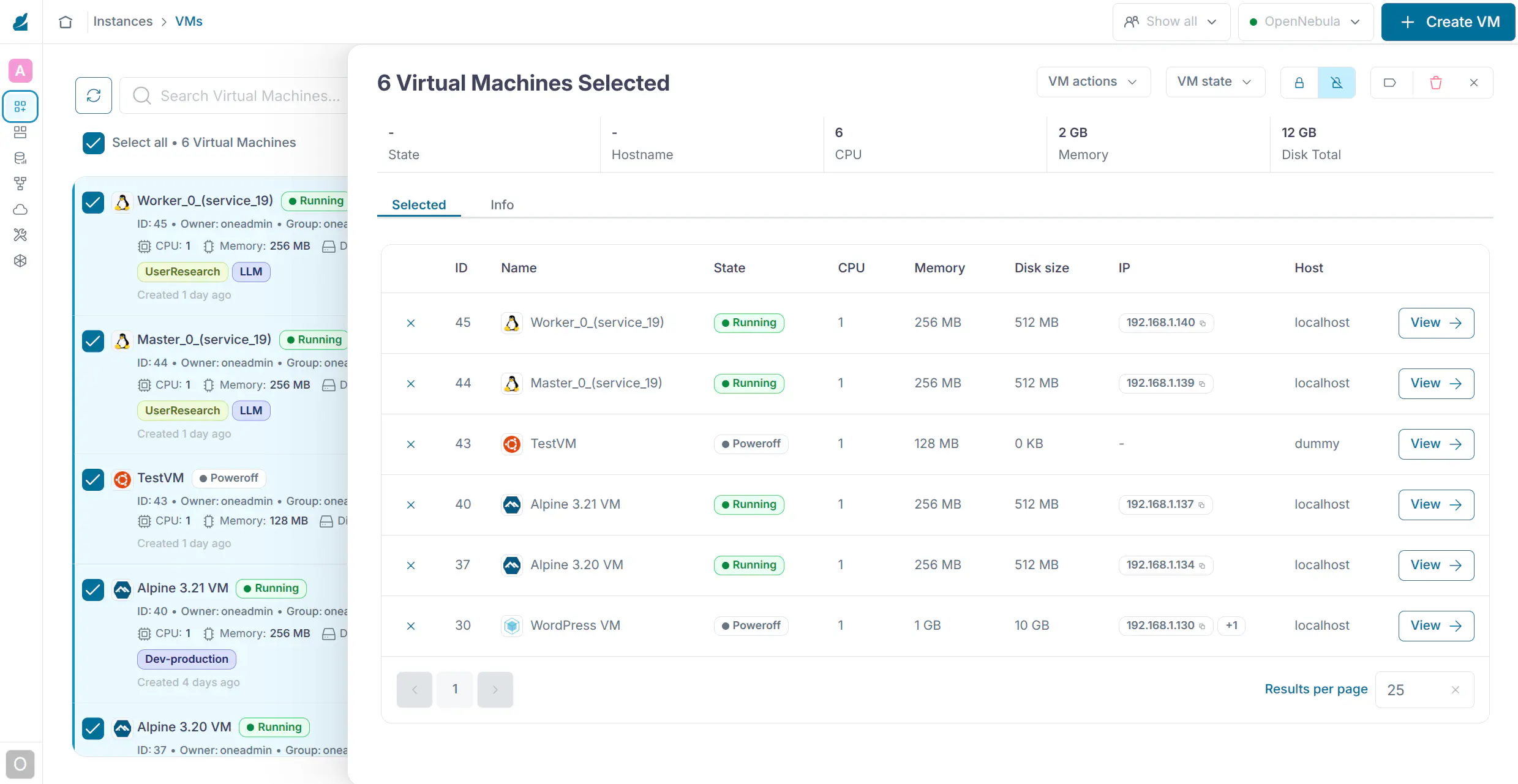
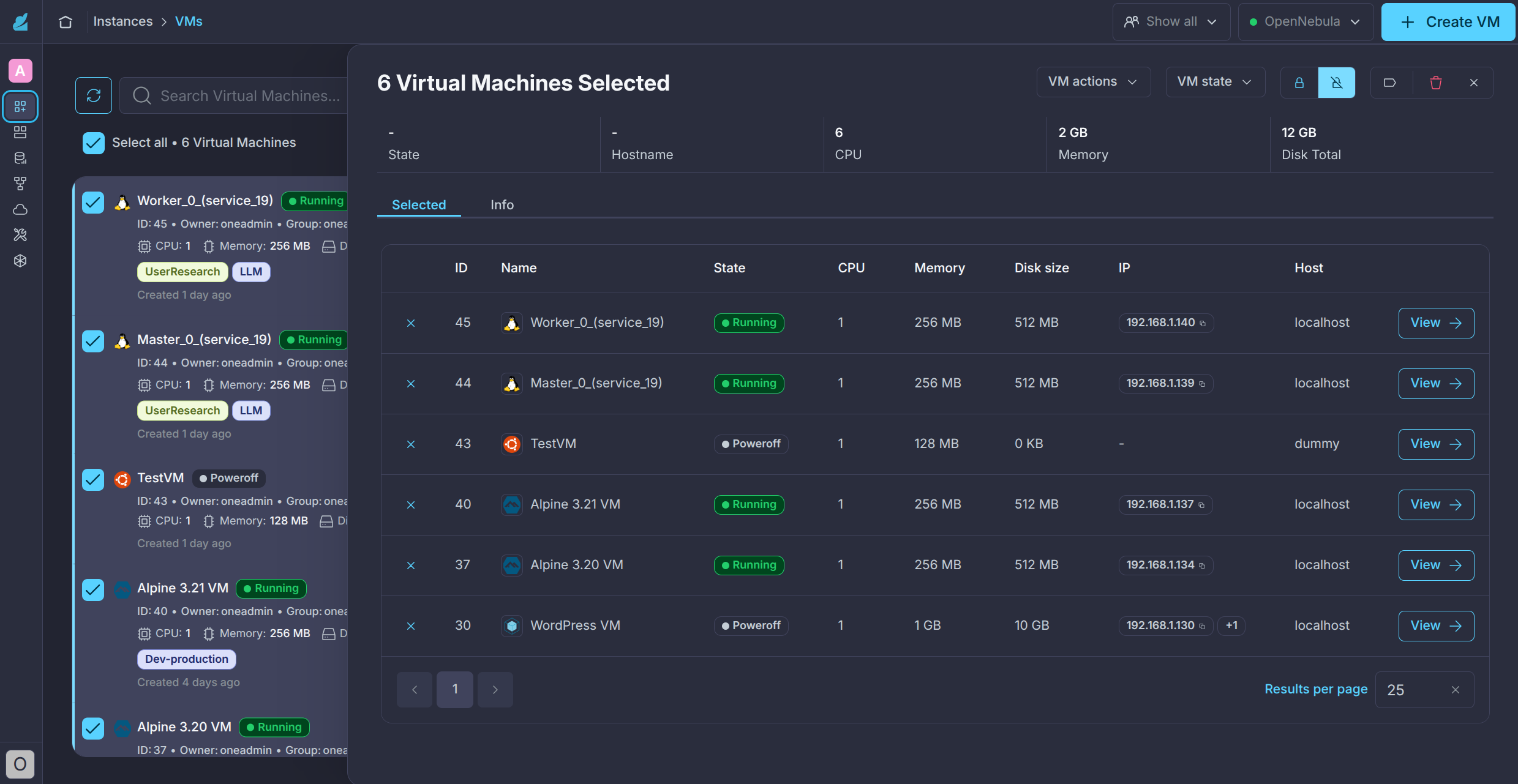
Complete redesign of the Sunstone interface, introducing a new design system driven by a systematic useability audit. This redesign is the first step in the implementation of an improved Sunstone experience with simpler, more streamlined user navigation and workflows. The following aspects have been improved in the redesign:
- Completely Redesigned Interface — A new design system built on a systematic usability audit delivers a cleaner, more consistent visual language with improved information architecture, updated typography, and a refined colour palette that scales across screen sizes and devices.
- Redesigned Settings and Navigation — The application structure has been reorganized from the ground up. A new settings experience and clearer navigation hierarchy make it faster to find what you need and easier to understand where you are in the app.
- New Item Exploration via Side Drawer — Resources can now be inspected without leaving the current context. A new slide-in drawer lets operators quickly explore the details of any item — VMs, Hosts, networks — without losing their place in the workflow.
- Richer Resource Visualization — Individual resource views have been redesigned to surface the most relevant information upfront, reducing the need to dig through tabs to get a clear picture of an item’s state, configuration, and relationships.
- Added FSaaS (VirtioFS) Support — Users can now manage shared storage file systems, create filesystem images, and attach disks directly from the Sunstone GUI.
OneFlow
- Added the capacity to batch delete scheduled actions from all service VMs, negating the need to delete actions from each individual VM.
Storage & Backups
- LVM SAN storage is now a Community Edition feature, available to all OpenNebula users, enabling flexibility such as dynamic resizing of logical volumes, live VM migration between Cluster notes, and volume grouping.
- Added interactive backup integration support, enabling third-party backup integrations to pull full and CBT incremental
qcow2and LVM VM backups directly from KVM hypervisors through the OpenNebula Backup Exporter (OneBEX). - Added S3 backend support for Restic Backup Datastores, allowing backups to be stored in AWS S3 and S3-compatible object storage such as MinIO, Garage, or Ceph RGW.
- Added selected disk backups, allowing VM backup configurations and Backup Jobs to back up only a defined subset of eligible VM disks. Selected-disk backups can be restored as individual disks.
- Updated the Veeam Backup integration architecture to connect Veeam to OpenNebula through the Front-end and pull backup data directly from hypervisors through OneBEX, removing the need for a separate oVirtAPI server VM.
AI Factories
- Integration of the NVIDIA Infra Controller (NICo) delivers automated AI Factory-scale provisioning of accelerated bare-metal hardware, with full lifecycle management including hardware discovery, firmware validation, DPU provisioning, and multi-tenant operation through an API.
API and CLI
- New CLI commands
onevm vmgroup-addandonevm vmgroup-delenable dynamic VM Group management, with the capacity to add or remove VMs from a VM Group dynamically. - OneGate now exposes the Sinatra server configuration through the
:serversection inonegate-server.conf, allowing administrators to customize supported Sinatra settings such as Host authorization.
KVM
- Added filtering by OS ID/type/version/architecture in QEMU Guest Agent Monitoring.
- Gather network information using qemu-guest-agent when QEMU Guest Agent Monitoring is enabled.
- Added per-VM live migration tuning through
MIGRATE_AUTO_CONVERGEandMIGRATE_COMPRESSED, allowing administrators to improve live migration convergence for busy KVM guests.
OpenNebula Managed Kubernetes Service
- Added multi-cluster deployment support in OneKS, allowing users to select the target OpenNebula Cluster and deployment networks when creating Kubernetes Clusters.
- Added pre-deployment diagnostics for OneKS provisioning, enabling users to validate the readiness a deployment placement option prior to deployment to avoid time-consuming provisioning failures.
Networking
- VLAN Rules enable cloud administrators to delegate VLAN management to tenants in multi-tenant clouds, enabling tenant self-provisioning of Virtual Networks.
- Support for SR-IOV capable PCI network interfaces in Switchdev mode with Open vSwitch.
- Added support for dummy interfaces, allowing KVM VMs to use guest NICs that are not attached to any OpenNebula Virtual Network.
- Added the optional
MAC_GLOBAL_SPACEgeneration mode, which allocates generated MAC addresses from a global pool to prevent collisions across Virtual Networks. - Added round-robin Address Range lease assignment, reducing immediate reuse of recently released addresses when new NICs are allocated.
- Added support for Host-specific TProxy configuration, allowing per-host configuration overrides to simplify deployments across multiple Clusters, racks, or network zones.
Packaging
OneSwap
- Added Windows OS Profile/Best practices VM template options to OneSwap Windows conversion.
- OneSwap batch VM conversion enables the migration of multiple VMs in a single execution.
- OneSwap hybrid migrations can now use striped transfers with
--download-stripes, splitting datastore downloads across multiple HTTP range requests to improve transfer throughput.
AI Factories
- Integration of the NVIDIA Infra Controller (NICo) introduces Bare Metal as a Service to OpenNebula, streamlining the lifecycle management of bare-metal instances within multi-tenant, AI Factory-scale infrastructures.
- The enhanced Slurm appliance simplifies the creation of Slurm Clusters for AI and HPC workloads, with out-of-the-box compatibility with NVIDIA GPUs and both external and local LDAP support for multi-tenant workload management.
OpenNebula Distributed Resource Scheduler
- OneDRS now supports storage migrations in addition to migrations across Hosts when optimizing Cluster workloads.
- OneDRS can now skip automatic migration for VMs whose user template sets
ONEDRS_BLOCKEDtoYES. - OneDRS can now prioritize storage migrations over Host migrations with
PRIORITIZE_STORAGE_MIGRATIONSwhen both options provide the same optimization benefit.
Features Backported to 7.2.x
Additionally, the following functionalities are present that were not in OpenNebula 7.2.0, although they debuted in subsequent maintenance releases of the 7.2.x series:
- Enabled the customization of the favicon in FireEdge.
- Added the capacity to batch delete scheduled actions from all service VMs, negating the need to delete actions from each individual VM.
Other Issues Solved
- Fix marketplace broken redirect link #7291.
- Fix missing units in “Size on instantiate” VM Template instantiation #7672.
- Fix VM log is not showing up in the FireEdge if
USE_VMS_LOCATION=YES#7680. - Fix Zombie VMs not being shown in the corresponding Host tab in FireEdge #7472.
- Fix VM CDROM hot-attach without target or dev-prefix #7736.
- Fix API commands executed on HA follower, for full list of commands the GitHub issue #7725.
- Fix onehost failing on CLI-only installs due to an unconditional require of HostSyncManager #7768.
- Fix AutoNFS bug where
NFX_AUTO_*attributes are not correctly read, preventing the automatic mount #7763. - Fix OneDRS placement failure for LVM SAN EE datastore with
KeyErroron Image DS ID #7752. - Fix LVM datastore capacity reporting based on filesystem capacity instead of the configured volume group capacity, causing incorrect scheduler rejections #7721.
- Fix incorrect reporting of sizes for VirtioFS images #7751.
- Fix OneKS Clusters stuck in DEPROVISIONING state if a OneKS group becomes empty during the deprovisioning process #7749.
- Fix unrecoverable WARNING state of OneKS groups after recovery of OneKS Cluster #7748.
- Fix OneKS lifecycle operations after renaming a Cluster by using stable Kubernetes identifiers #7724.
- Fix oneswap compatibility issue with vCenter 8.0.3 #7698.
- Fix
opennebula-exportercrash when monitoring diskless VMs #7703. - Fix Veeam worker IP detection by reading the worker IP from the init script before attaching the management NIC #7750.
- Fix PCI attach to prevent bus address collisions #7695.
- Fix lack of VLAN tags clearance in OVS when removing them from Virtual Network #7707.
- Fix LVM post-reboot activation silently skipping VM disks #7720.
- Fix OVS port QinQ vlan mode being overwritten with changes introduced in#7657.
- Fix MAC address range parsing for invalid MAD address ranges #7233.
- Fix Signature v4 support for non-AWS S3 Marketplace storage backends #7485.
- Fix file-based image cloning between two datastores with BRIDGE_LIST #7762.
- Fix AutoNFS not working correctly when used on System Datastores of type
shared#7763. - Fix LVM concurrency issue with parallel deployments from different Hosts using the same VG #7719.
- Fix various logrotate issues #7646.
- Fix Datastores rounding off capacity values #7777.
- Fix
VOLATILEdisks not being considered during LVM and CEPH backups #7914. - Fix Veeam LVM volatile incremental backups by reporting volatile disks with the correct format #7786.
- Fix
SD_DISK_BUSnot taken in account when attaching a disk #7590. - Fix
queuesattribute in disk driver element is only supported for virtio bus #7586. - Fix default
IOTHREADno applied when attaching a virtio disk #7588. - Fix Ceph/RBD VM backup leaving temporary RBD snapshots after successful backup #7717, #7918.
- Fix OneDRS not using predictive resource usage when generating optimization plans #7915.
- Fix volatile disks not being instantiated as thin LVs when
LVM_THIN_ENABLE=YES#7924. - Fix PCI device and PCI NIC quota accounting when instantiating VMs from templates #7922.
- Fix OneForm not restarting after a leader change in HA configurations #7562.
- Fix OneGate TProxy connectivity failing when the Host uses strict ARP policies #7691.
GIVE FEEDBACK
Was this resource helpful?
Glad to hear it
Sorry to hear that