LVM SAN Datastore
With LVM SAN Datastore, both disks images and actual VM drives are stored as Logical Volumes (LVs) in the SAN storage. This allows for fast and efficient VM instantiation, as no data needs to be copied or moved.
Use this option for high-end Storage Area Networks (SANs) when a dedicated driver for that hardware, such as NetApp, is not available. The same LUN can be exported to all the Hosts while Virtual Machines will be able to run directly from the SAN.
How Should I Read This Chapter
Before performing the operations outlined in this chapter, you must configure access to the SAN following one of the setup guides in the LVM Overview section.
Hypervisor Configuration
In this first step, you will configure hypervisors for LVM operations over the shared SAN storage.
Hosts LVM Configuration
Prerequisites:
- LVM2 must be available on Hosts.
lvmetadmust be disabled. Set this parameter in/etc/lvm/lvm.conf:use_lvmetad = 0, and disable thelvm2-lvmetad.serviceif running.oneadminneeds to belong to thediskgroup.- All the nodes need to have access to the same LUNs.
In case of rebooting the virtualization Host, the volumes need to be activated to have them available for the hypervisor again. There are two possibilities:
- If the node package is installed, they will be automatically activated by the
/etc/cron.d/opennebula-nodecron file. - Otherwise, manual activation will be required. For each volume device of the Virtual Machines running on the Host before the reboot, run
lvchange -K -ay $DEVICE. You can also run on the Host the activation script/var/tmp/one/tm/lvm/activate, located in the remote scripts.
Virtual Machine disks are symbolic links to the block devices. However, additional VM files like checkpoints or deployment files are stored under /var/lib/one/datastores/<id>. To prevent filling local disks, allocate plenty of space for these files.
Front-end Configuration
The Front-end needs to be configured as it’s described in the corresponding section of either Everpure, NetApp or Generic SAN depending on the SAN type you have.
OpenNebula Configuration
In this step you configure OpenNebula to interface with the SAN. For this purpose, create the two required OpenNebula datastores: Image and System. Both of them use the lvm transfer driver (TM_MAD).
Create System Datastore
To create a new SAN/LVM System Datastore, set the following template parameters:
| Attribute | Description |
|---|---|
NAME | Name of the Datastore |
TYPE | SYSTEM_DS |
TM_MAD | lvm |
DISK_TYPE | BLOCK (used for volatile disks) |
BRIDGE_LIST | Front-end will use hosts in the list to proxy SAN operations |
For example:
> cat ds_system.conf
NAME   = lvm_system
TM_MAD = lvm
TYPE   = SYSTEM_DS
DISK_TYPE = BLOCK

> onedatastore create ds_system.conf
ID: 100
Create Image Datastore
To create a new LVM Image Datastore, set following template parameters:
| Attribute | Description |
|---|---|
NAME | Name of Datastore |
TYPE | IMAGE_DS |
DS_MAD | lvm |
TM_MAD | lvm |
DISK_TYPE | BLOCK |
BRIDGE_LIST | Front-end will use hosts in the list to proxy SAN operations |
LVM_THIN_ENABLE | (default: NO) YES to enable LVM Thin functionality (RECOMMENDED). |
The example below illustrates the creation of an LVM Image Datastore:
> cat ds_image.conf
NAME = lvm_image
DS_MAD = lvm
TM_MAD = lvm
DISK_TYPE = "BLOCK"
TYPE = IMAGE_DS
LVM_THIN_ENABLE = yes
SAFE_DIRS="/var/tmp /tmp"

> onedatastore create ds_image.conf
ID: 101
Afterwards, create an LVM VG in the shared LUN for the image datastore with the
following name: vg-one-<image_ds_id>. This step is performed once, either in one host,
or the front-end if it has access. This VG is where both images and VM disks will be located, and
OpenNebula will take care of creating and managing the LVs for each of them.
BRIDGE_LIST in both the System and
Image datastores. The listed Hosts must have access to the SAN storage and the required LVM tools
installed. For example: BRIDGE_LIST = "host1 host2".For example, assuming /dev/mapper/mpatha is the LUN (iSCSI/multipath) block device:
# pvcreate /dev/mapper/mpatha
# vgcreate vg-one-101 /dev/mapper/mpatha
Driver Configuration
The following attributes can be set in /var/lib/one/remotes/etc/datastore/datastore.conf:
SUPPORTED_FS: Comma-separated list with every filesystem supported for creating formatted datablocks.FS_OPTS_<FS>: Options for creating the filesystem for formatted datablocks. Can be set for each filesystem type.
SUPPORTED_FS list, verify that the corresponding mkfs.<fs_name> command is available in all Hosts including the front-end and hypervisors. The system will revert to the default filesystem if an unsupported one is detected.Changing Persistency Mode
Persistent and non-persistent images use different Logical Volume layouts in the LVM SAN datastore. Changing the PERSISTENT attribute directly does not convert the underlying LVM layout.
To convert a persistent image to a non-persistent one:
- Instantiate a VM using the persistent image.
- Use the Save As operation on the VM disk to create a new non-persistent image in the LVM Image Datastore.
- Once the operation completes, verify that the new image is in the
READYstate.
Datastore Internals
To benefit from LVM Thin Provisioning, both images and disks are stored on the same VG which is the one associated to the OpenNebula Image Datastore. So, there is not a direct mapping from the System Datastore to any VG; VM disks instantiated from a given image are located at the same VG/LUN as the image they came from.
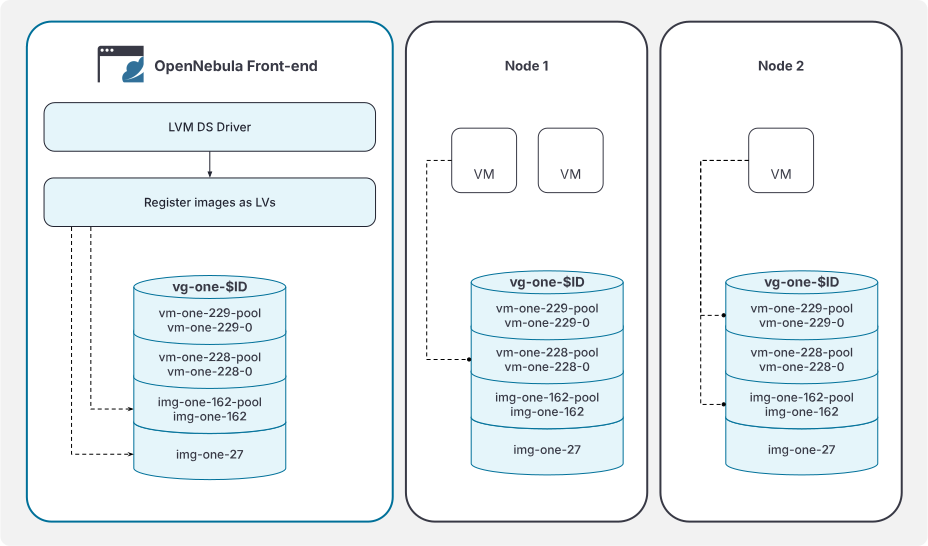
Images are stored in a different format depending on whether they are persistent or not.
- Persistent images are stored as a Thin Pool called
img-one-<imgid>-pool, containing at least a Thin Volume calledimg-one-<imgid>. Example for image ID 162:
# lvs
  LV               VG         Attr       LSize   Pool
  img-one-162      vg-one-101 Vwi---tz-k 512.00m img-one-162-pool
  img-one-162-pool vg-one-101 twi---tz-k 512.00m
The images are automatically activated when a VM runs them. After activation, volume looks like this from the
host. Include the -a flag to see also the hidden pool data/metadata LVs:
# lvs -a
  LV                       VG         Attr       LSize   Pool             Data%  Meta%
  img-one-162              vg-one-101 Vwi-aotz-k 512.00m img-one-162-pool 42.41
  img-one-162-pool         vg-one-101 twi---tz-k 512.00m                  42.41  12.30
  [img-one-162-pool_tdata] vg-one-101 Twi-ao---- 512.00m
  [img-one-162-pool_tmeta] vg-one-101 ewi-ao----   4.00m
Note the active state and the open device bits both in the Thin Volume and both Pool LVs. Additionally, the output of the command displays usage statistics.
Disk snapshots made during the VM lifetyme are created within the Pool, and preserved across VM instantiations. Here is the situation after creating a couple of snapshots and then terminating the VM following the previous example:
# lvs
  LV               VG         Attr       LSize   Pool             Origin
  img-one-162      vg-one-101 Vwi---tz-k 512.00m img-one-162-pool
  img-one-162-pool vg-one-101 twi---tz-k 512.00m
  img-one-162_s0   vg-one-101 Vwi---tz-k 512.00m img-one-162-pool img-one-162
  img-one-162_s1   vg-one-101 Vwi---tz-k 512.00m img-one-162-pool img-one-162
Upon image deletion, the Thin Pool and all its Thin Volumes like disks and snapshots are deleted.
- Non-persistent images are stored as a regular LV called
img-one-<imgid>. Example for image ID 27:
# lvs
  LV               VG         Attr       LSize   Pool
  img-one-27       vg-one-101 -ri------k 512.00m
On activation, a Thin Snapshot called vm-one-<vmid>-<diskid> is created inside a per-VM Thin
Pool called vm-one-<vmid>-pool. For example, launching a VM containing the previous image as a
disk results in the following:
# lvs
  LV               VG         Attr       LSize   Pool             Origin     Data%  Meta%
  img-one-27       vg-one-101 ori------k 512.00m
  vm-one-228-0     vg-one-101 Vwi-aotz-k 512.00m vm-one-228-pool  img-one-27 1.03
  vm-one-228-pool  vg-one-101 twi---tz-k 512.00m                             1.03   10.94
Note the origin flag now being set on the base image, as it is now used as vm-one-228-0’s
origin. Given that the base image is also set to read-only, the same image can be used as the
origin of several disks. The disk volume (vm-one-228-0) is a thinly provisioned copy-on-write
read-write volume that only stores the changed blocks from its origin.
When the disk is not needed anymore (e.g., VM terminated or disk detached) the volume is deleted as well as its snapshots (if any).
For more details about the inner workings of LVM Thin Provisioning, please refer to the lvmthin(7) man page.
GIVE FEEDBACK
Was this resource helpful?
Glad to hear it
Sorry to hear that