Veeam Backup (EE)
The OpenNebula-Veeam® Backup Integration exposes an oVirt-compatible REST API through the oVirtAPI server component, allowing Veeam to connect to OpenNebula as if it were an oVirt/RHV hypervisor. Veeam discovers OpenNebula resources through oVirtAPI and pulls backup data from hypervisors through the OpenNebula Backup Exporter (OneBEX). This integration enables image-level backups — incremental backups based on Changed Block Tracking (CBT) — and granular restores such as full VM and file-level restores from the Veeam console. This integration is exclusive to the OpenNebula Enterprise Edition (EE).
Features
| Area | Benefit | Description |
|---|---|---|
| Data Protection | Agentless, Image-Level Backups | Protect entire VMs without installing or managing agents inside the guest OS. |
| Efficiency | Incremental Backups (CBT) | Leverages Change Block Tracking (CBT) via the API to back up only the data that has changed, reducing backup windows. |
| Native Integration | Uses Standard Veeam Workflow | Connect OpenNebula as a standard “oVirt” hypervisor in Veeam. No additional custom Veeam plug-ins are required. |
| Recovery | Flexible Restore Options | Enables Full VM restores, instant VM recovery, and file-level restores directly from the Veeam B&R console. |
| Automation | Full Discovery | Veeam automatically discovers and displays the OpenNebula Cluster hierarchy (Clusters, Hosts, VMs, and storage). |
| Portability | VMWare import | Enables restoring Virtual Machines backed up in Veeam from VMWare into OpenNebula. |
Compatibility
The oVirtAPI module is compatible with the Veeam Backup & Replication version specified in the Platform Notes.
The following table summarizes the supported backup modes for each storage system:
| Storage | Full | Incremental |
|---|---|---|
| File (qcow2) | Yes | Yes |
| File (raw) | No† | No† |
| Ceph | No† | No† |
| LVM | Yes | Yes |
| NetApp | No† | No† |
| PureFA | No† | No† |
† These backup modes were supported in previous OpenNebula versions, such as 7.0 and 7.2. In OpenNebula version 7.4, they are not supported by the current OneBEX-based integration, but are planned to be supported in a future maintenance releases.
Volatile Disk Backups
Volatile disks cannot be backed up by default. To back up volatile disks, enable this functionality in the OpenNebula Virtual Machine configuration by setting the BACKUP_VOLATILE parameter to YES. Otherwise, the disk is not listed in Veeam. For more information about volatile disk backups in OpenNebula, see the backup documentation page.
Limitations
The following is a list of the limitations affecting the Veeam integration with OpenNebula:
- The KVM appliance deployed by Veeam does not include context packages. To configure the appliance network, either manually choose any available free IP in the management network or set up a DHCP service.
- Alpine Virtual Machines cannot be backed up.
- During upload image transfers, you may see a warning message stating
Unable to use transfer URL for image transfer: Switched to proxy URL. Backup performance may be affected. This is expected and shouldn’t affect performance. - Spaces are not allowed in Virtual Machine names in the integration. Avoid using them, even if they are allowed in OpenNebula itself, to prevent issues when performing in-place restores.
If you encounter other issues or bugs, check the Known Issues page for Veeam-related issues.
Architecture
To ensure a compatible integration between OpenNebula and Veeam Backup, the following components and network configuration are required:
- Veeam Workers: Deployed from the Veeam server to process backups and restores.
- OpenNebula Backup Exporter (OneBEX): Runs on demand on the OpenNebula hypervisors and exposes VM backup data to Veeam. See Interactive Backup Integrations for implementation details.
- Veeam (interactive) Backup Datastore: An OpenNebula
BACKUP_DSusingDS_MAD="interactive"andVEEAM_DS="YES". This datastore coordinates Veeam backup operations and tracks backup metadata. The backup itself is stored in the Veeam repository. - Management Network: Provides connectivity between all of the following components:
- OpenNebula Front-end
- OpenNebula OneBEX endpoint on each hypervisor
- All OpenNebula Hosts running VMs to be backed up
- Veeam Server
- Veeam Workers
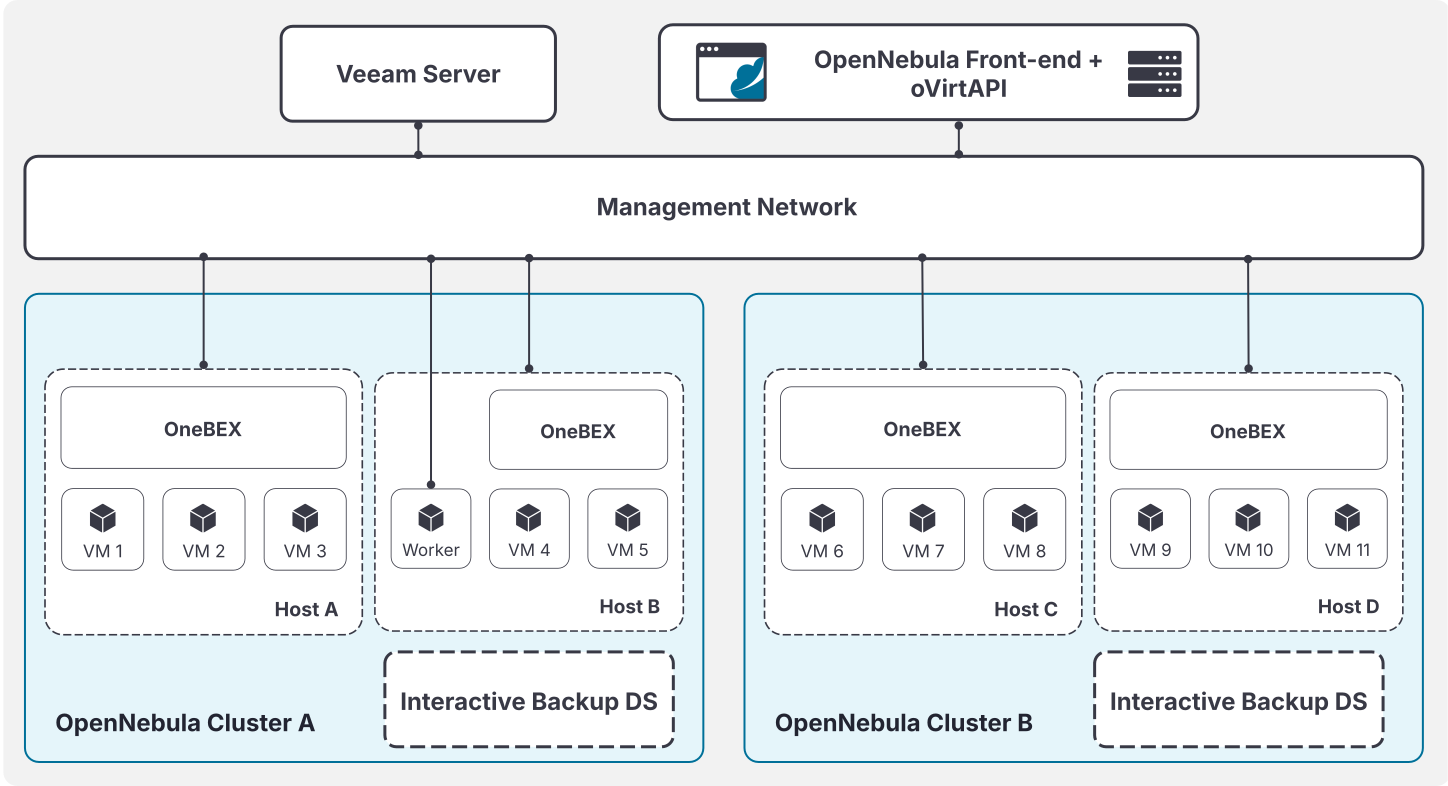
Installation and Configuration
1. Configure OneBEX
Configure OneBEX on every OpenNebula hypervisor that can run VMs backed up by Veeam. OneBEX starts on demand during the backup operation and exposes the prepared disk exports directly to Veeam.
The Veeam Server and Veeam Backup Appliance must be able to connect to the configured OneBEX address and port on each hypervisor.
By default, OneBEX uses unauthenticated HTTP on port 13014. This creates a security risk that VM disk data could be intercepted by a malicious 3rd-party during backup. Therefore it is recommended to encrypt OneBEX traffic.
To encrypt OneBEX traffic, configure TLS as described in Configuring SSL in the Hosts. Restrict the OneBEX ports with firewall rules so they are reachable only from the OpenNebula Front-end and the Veeam Server and Workers. These ports carry raw VM disk data while a backup is running.
During interactive restores, the restore writer listens on all interfaces (0.0.0.0) by default. Set the ONE_BEX_WRITER_ADDR environment variable in the Front-end to bind it to a specific address. Restrict the restore port range configured by port_min and port_max to the Front-end nodes that relay restore data because these ports accept raw image data without authentication or encryption.
Edit the OneBEX configuration in the OpenNebula remotes directory. Open the file in the following location:
/var/lib/one/remotes/etc/onebex/onebex-server.conf
After updating the configuration file, synchronize the Hosts:
onehost sync -f
For OneBEX parameters and API details, see Interactive Backup Integrations.
/var/lib/one/remotes/etc/onebex/onebex-server.conf need to be performed on all frontends.2. Enable VM Guest Agent Monitoring
The integration needs VM Guest Agent monitoring to be enabled. To do so set :enabled to true on the following file in the frontend:
/var/lib/one/remotes/etc/im/kvm-probes.d/guestagent.conf
Then, in the same frontend server execute the following command to propagate the remote into the KVM hosts:
onehost sync --force
/var/lib/one/remotes/etc/im/kvm-probes.d/guestagent.conf need to be performed on all frontends.3. Create the Veeam Backup Datastore
Create and configure the Veeam backup datastore in OpenNebula. This datastore uses the interactive datastore driver to start OneBEX, coordinate backup sessions initiated from Veeam, and store the corresponding OpenNebula backup metadata. The backup itself is stored in the Veeam repository.
The datastore template must include VEEAM_DS="YES" so the oVirtAPI Server can identify the datastore used by the Veeam integration, and also DS_MAD="interactive" so OpenNebula can handle the OneBEX workflow.
The following example template creates a Veeam backup datastore:
cat << EOF > /tmp/interactive-datastore.txt
NAME="VeeamDS"
DS_MAD="interactive"
TM_MAD="-"
TYPE="BACKUP_DS"
VEEAM_DS="YES"
RESTRICTED_DIRS="/"
SAFE_DIRS="/var/tmp"
EOF

onedatastore create /tmp/interactive-datastore.txt
Add the datastore to each Cluster containing VMs that will be backed up by Veeam:
onecluster adddatastore <cluster-name> <datastore-name>
For more information about the interactive driver internals, see Interactive Backup Integrations.
4. Install and Configure the oVirtAPI Module
To install the oVirtAPI module, configure the OpenNebula repository on the Backup Server by following the OpenNebula Enterprise Edition Repository Setup Guide. Then install the opennebula-ovirtapi package with the relevant package manager for your OS.
The configuration file can be found at /etc/one/ovirtapi-server.yml. Change the following variables before starting the service:
public_ip: IP address that Veeam will use to communicate with the frontend node.endpoint_port: Port used by the OpenNebula RPC endpoint (defaults to 2633).backup_freeze: (Optional) Controls which filesystem freeze mode OpenNebula requests when performing backups initiated via the oVirtAPI/Veeam integration. Valid values areNONE,AGENT, andSUSPEND. For details on each mode see the Backup Modes section in the backup guide: Backup Modes.
In the same configuration file, configure the OneBEX port and the port range reserved for interactive restores:
onebex_port: Port where OneBEX listens on the hypervisors. It must match the port configured inonebex-server.conf.onebex_port_ssl: Alternative port used for SSL. Optional, but recommended for secure Image Transfers. If used, it is mandatory to follow section 4.1 to enable this feature in the hosts. The recommended port is 13015.port_minandport_max: Range of available ports reserved for interactive restores.ports_path: File where the oVirtAPI Server tracks ports used for interactive restores.
During installation a self-signed certificate is generated at /etc/one/ovirtapi-ssl.crt for encryption. You can replace this certificate with your own and change the cert_path configuration variable.
Finally, start the service with either systemctl start apache2 (Ubuntu/Debian) or systemctl start httpd (RHEL/Alma).
In RHEL and Alma environments, you may face issues with the passenger package dependencies (mod_passenger and mod_ssl). You may add the correct repository and install the packages with the following:
curl --fail -sSLo /etc/yum.repos.d/passenger.repo https://oss-binaries.phusionpassenger.com/yum/definitions/el-passenger.repo
dnf install -y passenger mod_passenger mod_ssl
public_ip must be the VIP address, which is also the one we will use when adding OpenNebula as a Virtualization Platform in Veeam.4.1 Configuring SSL in the Hosts
If using SSL, an NGINX proxy needs to be setup on all hosts. If an Image Transfer is attempted by Veeam against a non-configured host while the onebex_port_ssl variable is defined, the backup will fail.
First, you will need to create a certificate for the host. This certificate needs to be signed by the CA authority used by the ovirtAPI server (defined as cert_path in the configuration file.). To make this task easier, a script is provided at /usr/lib/one/ovirtapi-server/scripts/generate_certificate.sh. You can run it with:
./generate_certs.sh -n <hostname> -c <ca-certificate> -k <ca-key> -C <destination-host-cert> -K <destination-host-key>
After generating the certificate, copy it to the respective host. We recommend storing it in /etc/one.
Then, you will need to install nginx on the host.
apt install nginx # Ubuntu/Debian
dnf install nginx # Rhel/Alma
Depending on the distribution, you will need to create the configuration file on a different location:
/etc/nginx/sites-enabled/one-ssl.conf   # Ubuntu/Debian
/etc/nginx/conf.d/one-ssl.conf          # Rhel/Alma
The configuration file must look like the following. Change the ssl_certificate and ssl_certificate_key paths to the ones you generated for this host. If you used a different port than 13015 in the ovirtapi configuration for SSL, make sure to change it in this configuration too.
server {
    listen 13015 ssl;
    listen [::]:13015 ssl;
    server_name _;

    # TLS Certificates
    ssl_certificate /etc/one/ovirtapi-ssl.crt;
    ssl_certificate_key /etc/one/ovirtapi-ssl.key;

    # Secure TLS Defaults
    ssl_protocols TLSv1.2 TLSv1.3;
    ssl_ciphers HIGH:!aNULL:!MD5;

    # Crucial for large disk transfers
    client_max_body_size 0;
    proxy_request_buffering off;
    proxy_buffering off;

    # Extended timeouts for large images
    proxy_read_timeout 3600s;
    proxy_send_timeout 3600s;
    client_body_timeout 3600s;

    location / {
        proxy_pass http://127.0.0.1:13014;

        proxy_set_header Host $host;
        proxy_set_header X-Real-IP $remote_addr;
        proxy_set_header X-Forwarded-For $proxy_add_x_forwarded_for;
        proxy_set_header X-Forwarded-Proto https;

        proxy_http_version 1.1;
        proxy_set_header Connection "";
    }
}
Finally, start/restart nginx to load the configuration file. You will need to repeat this workflow for each host.
5. Add OpenNebula to Veeam
This section will address the necessary steps to add OpenNebula as a Virtualization Platform into Veeam and deploy the necessary workers.
5.1. Add the New Virtualization Manager
First you need to add OpenNebula as an oVirt platform. To do so, follow the Adding oVirt KVM Manager to Backup Infrastructure Veeam guide with the following considerations:
- When selecting the DNS name or the IP address, it should match the
public_ipconfigured in the ovirtapi module. - On the Credentials tab, set the user and password used to access the OpenNebula Front-end. Use the
oneadminuser or another OpenNebula user with equivalent privileges. This is an OpenNebula user, not a system user. The user should be listed in the System/Users tab of FireEdge or through the CLI withoneuser list. - If the default certificate is used, Veeam may show an untrusted certificate warning. This is expected and will not affect the integration.
5.2. Deploy a KVM Worker
Next you need to deploy at least one KVM Worker. To do so, follow the Adding Workers Veeam guide with the following considerations:
- If you are not using a DHCP service, you will need to use a static address. You can set it to any free IP address in the management network.
- The DNS server used must be able to resolve the hostnames of all KVM hosts.
Restore Cleanup
Successful restores and restores cancelled from Veeam complete the cleanup lifecycle automatically.
However, if a restore fails, Veeam reports the error and the incomplete OpenNebula Image remains in LOCKED state. In that case, remove the incomplete Image manually from OpenNebula:
Get the restore transfer port from the Image PATH attribute, which has the form onebex://<IMAGE_DS_ID>:<PORT_ID>, and terminate the writer process associated with that port:
PORT=<PORT_ID>
pgrep -f "onebex_writer.rb .* ${PORT} " | xargs -r kill -TERM
oneimage delete --force <IMAGE_ID>
Logging Information
The oVirtAPI server writes logs in the following paths depending on the operating system:
- Ubuntu/Debian:
/var/log/apache2/error.log - Alma/RHEL:
/var/log/httpd/error.log
Additional logs for interactive backups are available on the hypervisors:
- OneBEX logs:
/var/log/one/onebex.log
GIVE FEEDBACK
Was this resource helpful?
Glad to hear it
Sorry to hear that