Distributed Resource Scheduler
The OpenNebula Distributed Resource Scheduler (DRS) optimizes resource allocation and prevents resource contention within a single OpenNebula Cluster. It integrates with OpenNebula’s built-in monitoring and forecasting systems, considering real-time Virtual Machine (VM) and Host usage metrics as well as predictions of future resource consumption.
OpenNebula DRS offers flexible automation levels, allowing recommendations to be generated and applied either automatically or manually. Administrators can review and execute migration suggestions through the OpenNebula Sunstone GUI.
Overview
OpenNebula DRS employs an integer linear programming (ILP) solver to optimize Cluster workload distribution. Key features include:
- Cluster Load Balancing: Distributes VM workloads across Hosts to balance resource usage, reducing contention and improving performance.
- Predictive DRS: Uses resource usage forecasts to provide proactive migration recommendations.
- Migration Recommendations: Generates migration suggestions, allowing administrators to manually approve or automate actions.
A VM might be migrated to another Host or another datastore, but can’t change both Host and datastore simultaneously.
Configuration and Usage
To enable OneDRS: In Sunstone, go to Infrastructure -> Clusters, select the relevant Cluster then click Enable OneDRS in the OneDRS tab. Alternatively, in the Cluster template set the ONE_DRS configuration attribute.
Configuring OneDRS for the Cluster requires setting the following options:
- Automation: Determines how OneDRS is used in a workflow.
- Policies: Defines how workloads are distributed across Hosts and datastores.
- Usage Metrics and Predictions: Specifies which resource metrics (CPU, Memory, Network, Disk) to consider for balancing.
- Migration Thresholds: Limits the number of migrations generated in an optimization cycle.
Automation Levels
Administrators can choose between different automation levels:
- Manual: Recommendations are displayed, but migrations must be manually approved.
- Partial: Migrations are periodically generated and require approval before execution.
- Full: Migrations are generated and applied automatically based on recommendations.
The following is an example of how manual automation appears in a Cluster template:
ONE_DRS=[
  AUTOMATION="manual",
  ... ]
Policy Configuration
OneDRS migrates VMs according to the defined policy:
- Packing: Minimizes the number of active Hosts to save energy or prepare for maintenance.
- Load Balancing: Distributes VMs across available Hosts or datastores to prevent resource contention.
The following is an example how the Load Balancing policy is specified within a Cluster template:
ONE_DRS=[
  POLICY="balance",
  ... ]
Load Balancing Objectives
The Load Balancing policy can combine multiple performance indicators:
- CPU Usage: Load distribution based on actual CPU utilization of the VM.
- CPU Capacity: Allocation based on requested CPU (the VM template attribute).
- Memory Usage: Balancing based on requested memory.
- Disk I/O: Consideration of read/write operations.
- Network Traffic: Optimization based on network throughput.
For example, you can balance CPU and disk usage equally, setting CPU and disk-associated weights to 50% each:
ONE_DRS=[
  CPU_USAGE_WEIGHT="0.5",
  CPU_WEIGHT="0",
  DISK_WEIGHT="0.5",
  MEMORY_WEIGHT="0",
  NET_WEIGHT="0",
  ... ]
Predictive DRS
OneDRS allows balancing based on monitored or predicted values. A prediction weight between 0 and 1 determines the influence of forecasts:
0: Only monitored values are used.1: Only forecasted values are used.- Between
0and1: Linear combination of both is used.
By default, DRS uses only monitored values.
It might also be specified within a cluster template, for example:
ONE_DRS=[
  PREDICTIVE="0",
  ... ]
Migration Threshold Configuration
Since migrations add overhead, administrators can set migration thresholds to limit the number of migrations per optimization cycle. You need to balance this setting: an aggressive threshold may negatively impact performance, while a conservative approach could overlook opportunities for improving the performance of the Cluster.
There are three values related to migration thresholds to set:
- Migration Threshold: The maximum combined number of VM migrations allowed between Hosts and datastores. By default, this number is not limited (i.e. the migration threshold is
-1). - Host Migration Threshold: The maximum number of VM migrations allowed between Hosts. By default, this number is not limited (i.e. the migration threshold is
-1). - Datastore Migration Threshold: The maximum number of VM migrations allowed between datastores. By default, this number is
0, which means that VM migrations between datastores are not allowed. For unlimited migrations, the threshold should be-1.
The following is an example of how migration thresholds can be defined in a Cluster template, if a user wants to allow 2 VM migrations between datastores, 3 VM migrations between Hosts, but only 4 migrations in total:
ONE_DRS=[
  DS_MIGRATION_THRESHOLD="2",
  HOST_MIGRATION_THRESHOLD="3",
  MIGRATION_THRESHOLD="4",
  ... ]
Each setting creates an additional constraint and all constraints must be obeyed.
Storage DRS
In addition to VM migrations between Hosts, DRS allows migrations between datastores. Storage migrations might be used to further improve the workload distribution across a Cluster. They are potentially effective for any policy or weight combination, because a storage migration can remove a datastore-capacity constraint that otherwise prevents a beneficial Host placement. Therefore, optimizing the workload using any policy or weight might include migrations between datastores.
The main limitation is the fact that a single VM can’t be migrated to another Host and another datastore during the same optimization cycle.
By default, storage migrations are disabled in OneDRS, by setting the datastore migration threshold to 0. To enable them, either set this value in Sunstone, the Cluster template, or the configuration file to:
- A positive integer to impose a limit
- “Unlimited” (Sunstone) or
-1(template and configuration) to avoid limitations
Note that even when storage migrations are disabled, a user might still be able to balance disk I/O by performing Host migrations, possibly with differing degrees of effectiveness.
Initial Placement
OneDRS can also handle the initial placement of pending VMs, selecting the most suitable Hosts and datastores. Unlike the default Rank Scheduler, which considers one VM at a time, OneDRS evaluates all pending VMs together for optimal placement.
Initial placement is configured in /etc/one/oned.conf by modifying the SCHED_MAD section:
SCHED_MAD = [
  EXECUTABLE = "one_sched",
  ARGUMENTS  = "-t 15 -p one_drs -o one_drs"
]
When using OneDRS for placement, the following differences from workload optimization apply:
- Only CPU and Memory balancing is available. There is no monitoring data for pending VMs.
- Predictive DRS is not applicable (forecasts are unavailable for pending VMs).
- Migration threshold settings do not apply.
OneDRS Configuration File
The main DRS configuration file is /etc/one/schedulers/one_drs.conf. This file defines default behavior, which can be overridden per Cluster. The following options can be defined:
DEFAULT_SCHED: Defines the ILP solver used.PLACE: Configures initial VM placement policies.OPTIMIZE: Defines workload optimization settings.PREDICTIVE: Weight of forecasted resource usage.MEMORY_SYSTEM_DS_SCALE: Adjusts for system datastore overhead.DIFFERENT_VNETS: Ensures NICs are assigned to different Virtual Networks.
Solver Configuration
OneDRS uses the PuLP library for ILP/MILP solvers, supporting multiple solvers such as:
- CBC Solver (default)
- GLPK
- Gurobi (commercial option with better performance)
Configuration:
SOLVER: Defines the solver (e.g.,CBC,GLPK,Gurobi).SOLVER_PATH: Specifies the path to the solver binary.
Scheduling Policies
Scheduling policies define optimization objectives:
PACK: Consolidates VMs on fewer Hosts to minimize active hardware.BALANCE: Distributes VMs across Hosts or datastores to reduce resource contention.
Example:
OPTIMIZE:
  POLICY: "BALANCE"
  WEIGHTS:
    CPU_USAGE: 1.0
Multi-metric placement example (CPU 60%, Memory 40%):
PLACE:
  POLICY: "BALANCE"
  WEIGHTS:
    CPU: 0.6
    MEMORY: 0.4
Migration Configuration
Migration configuration options are relevant only for workload optimization, and can contain the same settings as the Cluster template:
MIGRATION_THRESHOLD: The maximum combined number of VM migrations allowed between Hosts and datastores within an optimization cycleHOST_MIGRATION_THRESHOLD: The maximum number of VM migrations allowed between HostsDS_MIGRATION_THRESHOLD: The maximum number of VM migrations allowed between datastores
Another option is PRIORITIZE_STORAGE_MIGRATIONS. It decides if storage migrations will be prioritized over Host migrations (value "YES"), when they bring the same improvement with respect to the selected policy.
Complete Configuration Example
The following is a complete configuration file example for the OneDRS scheduler:
DEFAULT_SCHED:
  SOLVER: "CBC"
  SOLVER_PATH: "/usr/lib/one/python/pulp/solverdir/cbc/linux/64/cbc"

PLACE:
  POLICY: "PACK"

OPTIMIZE:
  POLICY: "BALANCE"
  MIGRATION_THRESHOLD: 10
  HOST_MIGRATION_THRESHOLD: -1
  DS_MIGRATION_THRESHOLD: 2
  PRIORITIZE_STORAGE_MIGRATIONS: "YES"
  WEIGHTS:
    CPU_USAGE: 0.2
    CPU: 0.2
    MEMORY: 0.4
    DISK: 0.1
    NET: 0.1

PREDICTIVE: 0.3

MEMORY_SYSTEM_DS_SCALE: 0

DIFFERENT_VNETS: YES
Blocking VM Migrations
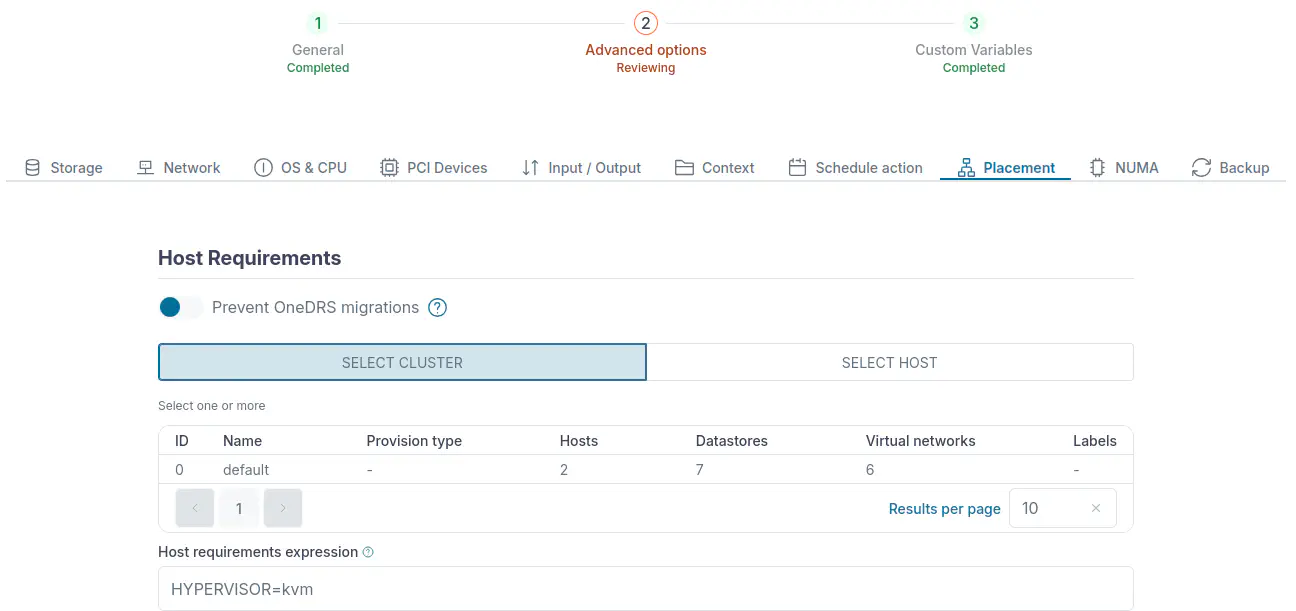
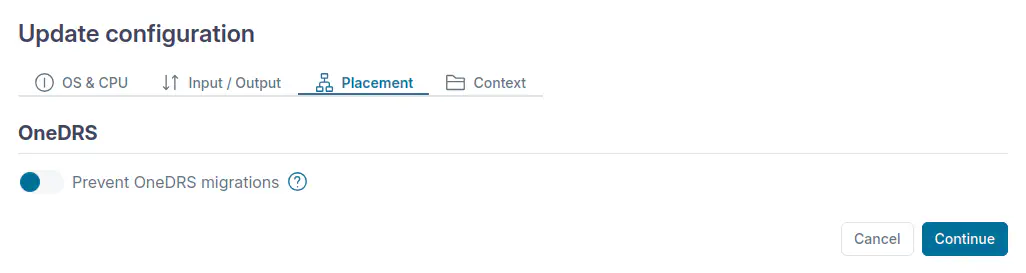
It is possible to avoid the migrations for specific VMs during workload optimization, by setting ONEDRS_BLOCKED to YES in its user template.
To achieve this in Sunstone for all VMs instantiated from a particular template, go to Templates > VM Templates and select the template. Then click Update (the icon with a pen) and Next to go to the advanced options (Step 2). Choose Placement and under Host Requirements select Prevent OneDRS migrations.
To prevent migrations for a specific VM in Sunstone, go to Instances > VMs and select the VM. Choose Configuration and click Update configuration. Choose Placement and select Prevent OneDRS migrations.
GIVE FEEDBACK
Was this resource helpful?
Glad to hear it
Sorry to hear that