OneForm Configuration
OpenNebula Form, also known as OneForm, is the hybrid provisioning engine for OpenNebula, responsible for automating the deployment, scaling, and configuration of edge and cloud infrastructure using Terraform and Ansible. It is delivered as a standalone service and interacts with the core OpenNebula services to register compute Hosts, Virtual Networks, and storage resources as part of a Provision lifecycle.
OneForm is installed by default as part of the standard OpenNebula package set and runs as a systemd service named opennebula-form. It can also be deployed independently on a separate Host if needed.
Architecture and Components
OneForm is built around a Sinatra-based API server, acting as an abstraction layer over OpenNebula to enable fully automated infrastructure provisioning. It provides a unified interface to manage heterogeneous environments, seamlessly integrating on-premises data centers, public cloud providers, and edge nodes under a consistent operational model.
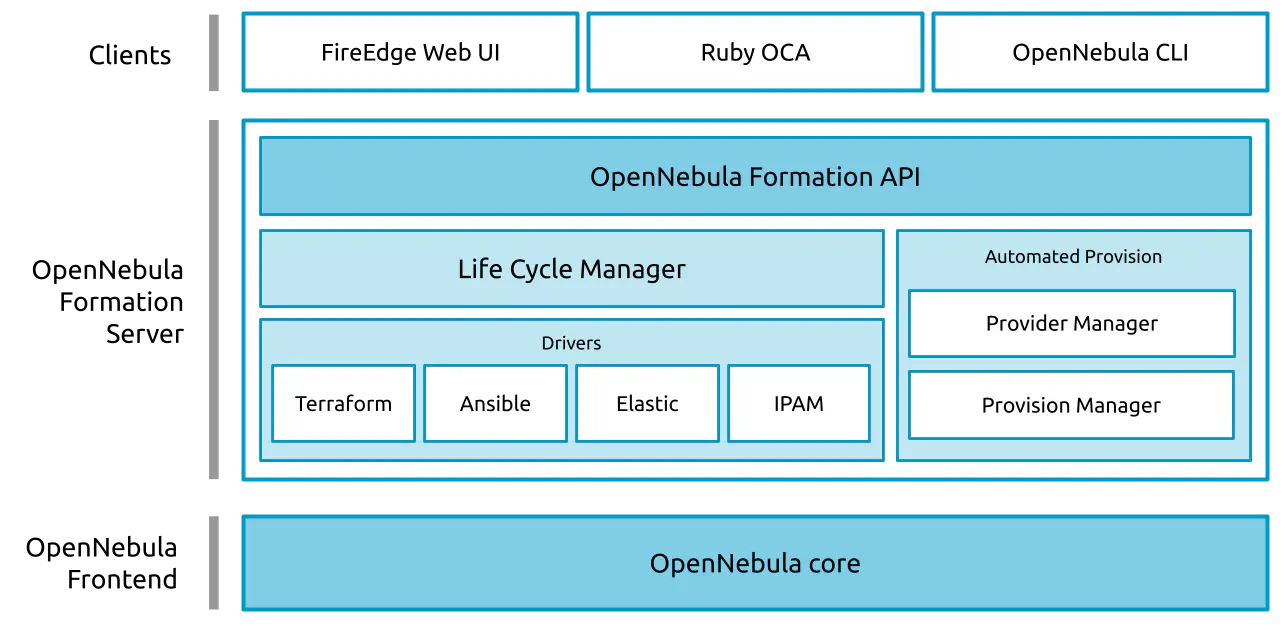
OneForm’s architecture is organized into three main layers:
- Clients: Includes the FireEdge Web UI, Ruby OCA, and the OpenNebula OneForm CLI, which enable interaction with the OneForm Server by users, developers and cloud administrators.
- OpenNebula OneForm Server: Acts as an abstraction layer over OpenNebula, enabling automated and consistent provisioning across multiple environments. The server is composed of the following core components:
- OneForm API: Provides a RESTful interface to access all features and operations exposed by OneForm. You can find the full API specification in the Development Integration Guide.
- Life Cycle Manager: Orchestrates the provisioning lifecycle through a state machine. It handles state transitions, error recovery, and coordinates with the driver layer. For a detailed overview, see the Provisioning Lifecycle section in the Provision Reference Guide.
- Drivers: A modular subsystem that encapsulates Provider credentials, provisioning workflows, configuration tasks, and networking logic, including integration with Terraform, Ansible, Elastic IP, and IPAM. To explore the driver structure and customization options, visit the OneForm Driver Development Guide.
- Automated Provisioning Managers: Handle the coordination and state management of Provider and Provision entities, ensuring their accurate representation within OpenNebula. For more insight into their data model, refer to the Provider and Provision Reference Guides.
- OpenNebula Frontend: Hosts the OpenNebula Core, which manages all virtual resources and serves as the orchestration and virtualization layer.
Server Configuration
The main configuration file for OneForm is located at /etc/one/oneform-server.conf.
It uses the YAML syntax, with the parameters listed in the table below.
| Parameter | Description |
|---|---|
| Server Configuration | |
:one_xmlrpc | URL endpoint for the OpenNebula XML-RPC API |
:host | IP address or hostname where the OneForm server will listen |
:port | TCP port used by the OneForm server |
| Defaults | |
:provisions_path | Directory where OneForm stores Ansible and Terraform generated files for each Provision |
| OneDeploy Configuration | |
:onedeploy_tags | Comma-separated list of OneDeploy tags to determine which stages to execute |
| Authentication | |
:auth | OneForm authentication method (typically opennebula) |
:core_auth | Authentication driver for OpenNebula core: cipher or x509 |
:expire_delta | Token expiration delta in seconds (used for token reuse window) |
| Logging | |
:log[:level] | Logging level: 0 = ERROR, 1 = WARNING, 2 = INFO, 3 = DEBUG |
:log[:system] | Logging output: file for local log files, syslog for system log integration |
Below is an example of a default OneForm configuration file:
:one_xmlrpc: http://localhost:2633/RPC2

:host: 127.0.0.1
:port: 13013

:provisions_path: /var/tmp/one/oneform
:onedeploy_tags: stage2,stage3

:auth: opennebula
:core_auth: cipher
:expire_delta: 3600

:log:
  :level: 2
  :system: file
Service Control and Logs
Change the OneForm server running state by managing the operating system service opennebula-form.
To start, restart or stop the server, execute one of:
systemctl start opennebula-form
systemctl restart opennebula-form
systemctl stop opennebula-form
To enable or disable automatic start on Host boot, execute one of:
systemctl enable opennebula-form
systemctl disable opennebula-form
Server logs for the OneForm server are available at:
/var/log/one/oneform.log
Additionally, the runtime output from Terraform and Ansible executions, along with general Provision logs, is stored in:
/var/log/one/oneform/$ID.log, where$IDidentifies the Provision.
Other logs are also available in journald. Use the following command to show the logs:
journalctl -u opennebula-form.service
GIVE FEEDBACK
Was this resource helpful?
Glad to hear it
Sorry to hear that