Provision Template
A Provision defines the configuration and parameters used to create infrastructure resources with OneForm. These objects are stored as JSON Documents within the OpenNebula database.
Provision Attributes
The following table describes all the required attributes used in Provision objects:
| Attribute | Description |
|---|---|
name | Name of the Provision. |
description | Short explanation of the purpose of the Provision. |
deployment_file | Identifier used to locate the deployment configuration (onedeploy inventory) for this Provision. |
cloud_provider | Internal identifier used to map the Provider to its corresponding driver folder. |
version | Version string used to track updates to the driver. |
fireedge | UI metadata used by FireEdge. |
user_inputs | Array of input definitions required from the user to customize the Provision. |
user_inputs_values | Actual values provided by the user during creation, matched to the input fields. |
provider_id | ID of the registered Provider used for provisioning the infrastructure. |
state | Current state of the Provision. |
one_objects | Collection of OpenNebula resources (Cluster, Hosts, networks, datastores) linked to the Provision. |
registration_time | Unix timestamp recording when the Provision was created. |
historic | Chronological list of relevant events and state transitions during the lifecycle of the Provision. |
tags | Optional key-value pairs used to categorize or label the Provision. |
Provisioning Life Cycle
Once created, OneForm manages the provisioning lifecycle using a state machine that defines the key operational states and the transitions between them. Each state is linked to specific actions, triggers, and callbacks that guide the execution and progression of the provisioning workflow.
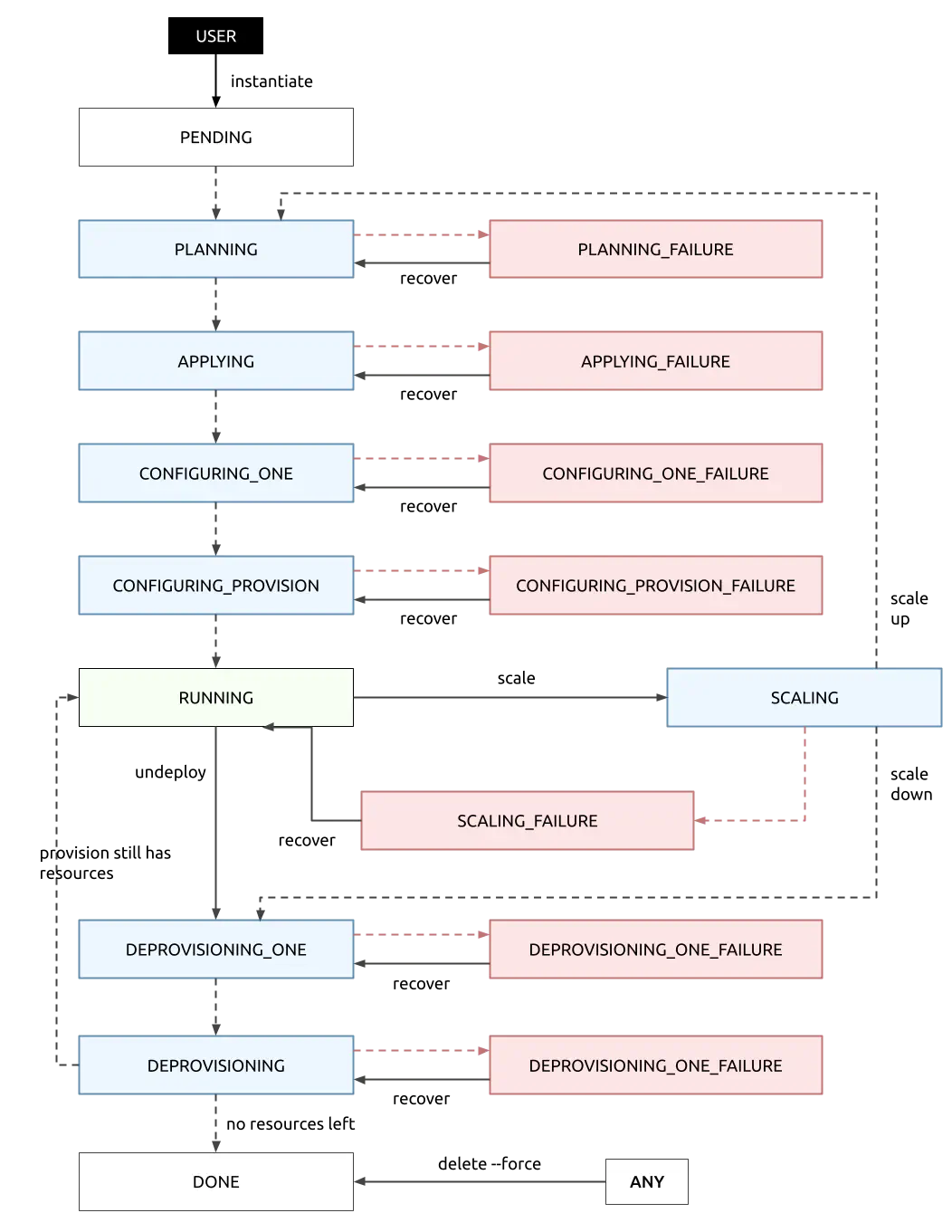
| State | Description |
|---|---|
INIT | Initial state where OneForm prepares the Provision environment by setting up directories and copying templates. |
PLANNING | Terraform validates the infrastructure plan and ensures required resources and configurations are in place. |
APPLYING | Terraform provisions infrastructure resources on the target cloud provider. |
CONFIGURING_ONE | OpenNebula objects are created to reflect the provisioned infrastructure. |
CONFIGURING_PROVISION | Ansible finalizes node configuration and prepares them for production. |
RUNNING | Provisioned infrastructure is fully operational and ready for use. |
SCALING | Handles the dynamic addition or removal of nodes during scaling operations. |
DEPROVISIONING_ONE | OpenNebula-managed objects are removed as part of the decommissioning process. |
DEPROVISIONING | Terraform deletes the infrastructure resources from the cloud provider. |
DONE | Final state indicating successful termination and resource cleanup. |
OpenNebula Objects
The one_objects attribute contains a structured representation of resources managed by OpenNebula as part of a Provision lifecycle. Each of these objects, such as Clusters, Hosts, networks, or datastores, includes several attributes with distinct purposes and behaviors.
The following table describes the common attributes shared across these OpenNebula objects:
| Attribute | Required | Description |
|---|---|---|
id | Yes | OpenNebula ID object, used to reference the resource. |
name | Yes | Name assigned to the OpenNebula object. |
resource_id | No | Identifier of the resource in the cloud provider (e.g., instance ID for a Host). Used only for resources mapped to the cloud. |
template | No | Contains the OpenNebula template definition for the object (e.g., networking or datastore configuration). Default values are used for the object if empty. |
childs | No | Lists dependent OpenNebula resources not provisioned directly, but tied to the object (e.g., VMs in a Host, images in a DS). Empty by default. |
one_objects attribute is automatically generated by OneForm based on the contents of the OneDeploy inventory. Specifically, it parses the rendered inventory template located at <driver_name>/ansible/templates/<deployment_file>.j2, which defines the OpenNebula resources associated with the Provision. For a detailed explanation of how this mechanism works and how to customize it, please refer to the OneForm Development Guide.An example of this attribute is shown below:
{
  "one_objects": {
    "cluster": {
      "id": 118,
      "name": "AWS SSH Cluster"
    },
    "hosts": [
      {
        "id": 21,
        "name": "3.74.216.118",
        "resource_id": "i-006a01c592f849031",
        "childs": { "vms": [30, 33] }
      }
    ],
    "networks": [
      {
        "id": 45,
        "name": "private_aws_network",
        "template": {
          "phydev": "enp125s0",
          "vn_mad": "vxlan",
          "vxlan_mode": "evpn",
          "vlan_id": "automatic",
          "dns": "8.8.8.8",
          "gateway": "192.168.0.1",
          "ip_link_conf": "nolearning=",
          "ar": [ {"type": "IP4", "ip": "192.168.0.100", "size": 100 }
          ]
        },
        "childs": {}
      }
    ],
    "datastores": [
      {
        "id": 136,
        "name": "aws_system_ds",
        "template": {
          "type": "SYSTEM_DS",
          "tm_mad": "ssh",
          "safe_dirs": "/var/tmp /tmp"
        },
        "childs": { "images": [5, 6] }
      },
      {
        "id": 137,
        "name": "aws_image_ds",
        "template": {
          "type": "IMAGE_DS",
          "ds_mad": "fs",
          "tm_mad": "ssh",
          "safe_dirs": "/var/tmp /tmp"
        },
        "childs": { "images": [3, 4] }
      }
    ]
  }
}
User Inputs
User inputs are dynamically extracted from the Terraform definition (terraform/variables.tf) associated with the Provision. These inputs represent fields prompted to the user upon Provision creation. Each input can include specific validation rules (match objects) to ensure correct and consistent configurations.
An example of user_inputs is shown below:
{
  "user_inputs": [
    {
      "name": "instance_type",
      "description": "Instance type to use for the instances",
      "type": "string",
      "default": "c5.metal",
      "match": {
        "type": "list",
        "values": ["c5.metal", "m5.large"]
      }
    },
    {
      "name": "instance_disk_size",
      "description": "Root disk size for the instance",
      "type": "number",
      "default": 128,
      "match": {
        "type": "number",
        "values": {"min": 32, "max": 1024}
      }
    }
  ]
}
User inputs can also define validation rules using the match object. In the case of instance_disk_size, the validation ensures that the disk size value will be between 32 and 1024 GB in this case. For more information about User inputs validation rules please refer to the OneForm Driver Development Guide.
Finally, when a Provision is created, the user-provided or default values are stored in the user_inputs_values to be used during provisioning:
{
  "user_inputs_values": {
    "instance_type": "c5.metal",
    "instance_disk_size": 128
  }
}
Historic
The Provision body includes a historic attribute that captures significant events and state transitions throughout the lifecycle of the Provision. This history helps to monitor, troubleshoot, and audit Provision deployments. Each entry of the historic attribute contains the following attributes:
- action: Type of event recorded. Indicates what kind of change occurred during the Provision lifecycle.
- description: Description of the event, usually including details such as object names or IDs.
- time: UNIX timestamp marking the exact moment when the event took place.
The following table shows the different types of actions that can appear in the historic log:
| Action Type | Description |
|---|---|
State changed | Indicates a transition between two provisioning states. |
Resource provisioned | A cloud resource (e.g., Host, IP) was successfully created by Terraform. |
Resource deprovisioned | A cloud resource was destroyed by Terraform during deprovisioning. |
OpenNebula object created | An OpenNebula object (e.g., Host, Network, datastore) was registered. |
OpenNebula object deleted | An OpenNebula object was removed during decommissioning. |
Here is an example of a Provision’s historic section, showing a few selected entries:
{
  "historic": [
    // ...
    {
      "action": "State changed",
      "description": "State changed from PENDING to INIT",
      "time": 1748598407
    },
    // ...
    {
      "action": "Resource provisioned",
      "description": "3.74.216.118 provisioned",
      "time": 1748598511
    },
    {
      "action": "OpenNebula object created",
      "description": "Host 21 created",
      "time": 1748598511
    },
    // ...
    {
      "action": "State changed",
      "description": "State changed from RUNNING to DEPROVISIONING_ONE",
      "time": 1748599299
    }
  ]
}
Special Attributes
Provisions can define special user inputs prefixed with oneform_. These attributes are not used directly by Terraform or OpenNebula, but are interpreted by OneForm during the provisioning process to control additional behaviors such as tagging, public IP assignment, or integration with existing infrastructure.
These special user inputs allow you to customize the lifecycle or attributes of a Provision beyond what’s declared in the template itself.
Provision Hosts
OneForm supports two special user inputs for defining the Hosts involved in a Provision. Each one enables a different provisioning strategy:
Cloud Hosts: Supported through the
oneform_hostsuser input. It is used to dynamically request a specific number of Hosts from a Provider. This value is interpreted by OneForm during the provisioning process and passed to the Terraform stage, which provisions the required infrastructure using the selected cloud provider. This input is also used during scaling operations, allowing OneForm to add or remove Hosts according to the specified amount.{ "user_inputs": [ { "name": "oneform_hosts", "description": "Number of instances to create", "type": "number", "default": 1, "match": { "type": "number", "values": { "min": 1, "max": 10 } } } ], "user_inputs_values": { "oneform_hosts": 1 } }On-Premise Hosts: Supported through the
oneform_onprem_hostsuser input. It allows you to specify a list of existing s IPs or hostnames to be used instead of provisioning new bare-metal Hosts from a cloud provider. When this input is present, OneForm skips the Terraform stage entirely and hands over the provided list to the configuration phase, which is executed via OneDeploy using Ansible. This is primarily used with the on-premises Provider and is ideal for hybrid environments or for integrating infrastructure that already exists outside of OneForm’s control.{ "user_inputs": [ { "name": "oneform_onprem_hosts", "description": "List of On-Premise Hosts IPs", "type": "list" } ], "user_inputs_values": { "oneform_onprem_hosts": [ "10.1.1.10", "10.1.1.11", "10.1.1.12" ] } }
oneform_onprem_hosts is defined, the provisioning process assumes manual control over the infrastructure and disables any automatic Host allocation.Public & Elastic IPs
The oneform_public_ips user input defines how many public IP addresses are assigned to the Provision’s public network. These IPs are requested directly from the cloud provider using IPAM drivers and dynamically attached to specific VMs by the Elastic driver. For a detailed explanation of how these drivers work, refer to the IPAM / Elastic Drivers Development Guide.
{
  "user_inputs": [
    {
      "name": "oneform_public_ips",
      "description": "Number of public IPs to allocate",
      "type": "number",
      "default": 0,
      "match": {
        "type": "number",
        "values": { "min": 0, "max": 5 }
      }
    }
  ],
  "user_inputs_values": {
    "oneform_public_ips": 2
  }
}
Tags
The oneform_tags user input is used to define custom metadata as key-value pairs. These tags are automatically applied to:
- All OpenNebula objects created during the Provision (e.g., Hosts, networks, datastores).
- Any external cloud resources provisioned via Terraform, provided the target cloud provider supports tagging (e.g., AWS, Scaleway).
Tags can be used for organizational purposes, filtering, automation triggers or external integrations.
{
  "user_inputs": [
    {
      "name": "oneform_tags",
      "description": "value of the tags to assign to the instance",
      "type": "map(string)",
      "default": {}
    }
  ],
  "user_inputs_values": {
    "oneform_tags": {
      "env": "dev",
      "owner": "cloudadmin@acme.net",
      "project": "my-project"
    }
  }
}
Advanced Setup
Permission to Create Provisions
Provisions are stored as Documents in the OpenNebula database. Documents are special types of resources in OpenNebula used by OneForm to store templates and information about Provisions. When a new user group is created, you can decide if you want to allow/deny its users to create Documents (and also OneForm Provisions). By default, new groups are allowed to create Document resources.
Full Template Example
Below is an example of a typical Provision body (after instantiating):
{
  "ID": "1",
  "UID": "0",
  "GID": "0",
  "UNAME": "oneadmin",
  "GNAME": "oneadmin",
  "NAME": "AWS SSH Cluster",
  "TYPE": "103",
  "PERMISSIONS": {
    "OWNER_U": "1",
    "OWNER_M": "1",
    "OWNER_A": "0",
    "GROUP_U": "0",
    "GROUP_M": "0",
    "GROUP_A": "0",
    "OTHER_U": "0",
    "OTHER_M": "0",
    "OTHER_A": "0"
  },
  "TEMPLATE": {
    "PROVISION_BODY": {
      "name": "AWS SSH Cluster",
      "description": "It deploys a SSH cluster on AWS",
      "deployment_file": "ssh_cluster",
      "provider_id": 0,
      "state": "RUNNING",
      "fireedge": {
        "logo": "aws_ssh_cluster.png"
      },
      "user_inputs": [
        {
          "name": "oneform_hosts",
          "description": "Number of instances to create",
          "type": "number",
          "default": 1,
          "match": {
            "type": "number",
            "values": { "min": 1, "max": 10 }
          }
        },
        {
          "name": "instance_type",
          "description": "Instance type to use for the instance",
          "type": "string",
          "default": "c5.metal",
          "match": {
            "type": "list",
            "values": ["c5.metal", "m5.large"]
          }
        },
        {
          "name": "instance_os_name",
          "description": "Operating system to use for the instance",
          "type": "string",
          "default": "ubuntu_2204",
          "match": {
            "type": "list",
            "values": ["ubuntu_2204", "ubuntu_2404"]
          }
        },
        {
          "name": "instance_disk_size",
          "description": "Root disk size to use for the instance",
          "type": "number",
          "default": 128,
          "match": {
            "type": "number",
            "values": { "min": 32, "max": 1024 }
          }
        },
        {
          "name": "oneform_public_ips",
          "description": "Number of public IPs to allocate",
          "type": "number",
          "default": 0,
          "match": {
            "type": "number",
            "values": { "min": 0, "max": 5 }
          }
        },
        {
          "name": "cidr_block",
          "description": "CIDR block for the VPC",
          "type": "string",
          "default": "10.0.0.0/16"
        },
        {
          "name": "oneform_tags",
          "description": "value of the tags to assign to the instance",
          "type": "map(string)",
          "default": {}
        }
      ],
      "user_inputs_values": {
        "oneform_hosts": 1,
        "onform_public_ips": 0,
        "instance_type": "c5.metal",
        "instance_os_name": "ubuntu_2204",
        "instance_disk_size": 128,
        "cidr_block": "10.0.0.0/16",
      },
      "one_objects": {
        "cluster": {
          "name": "AWS SSH Cluster",
          "id": 118
        },
        "hosts": [
          {
            "id": 21,
            "resource_id": "i-006a01c592f849031",
            "name": "3.74.216.118",
            "childs": { "vms": [30, 33] }
          }
        ],
        "networks": [
          {
            "id": 45,
            "name": "private_aws_network",
            "template": {
              "phydev": "enp125s0",
              "vn_mad": "vxlan",
              "vxlan_mode": "evpn",
              "vlan_id": "automatic",
              "dns": "8.8.8.8",
              "gateway": "192.168.0.1",
              "ip_link_conf": "nolearning=",
              "ar": [
                {
                  "type": "IP4",
                  "ip": "192.168.0.100",
                  "size": 100
                }
              ]
            },
            "childs": {}
          },
          {
            "id": 46,
            "name": "public_aws_network",
            "template": {
              "vn_mad": "elastic",
              "bridge": "br0",
              "netrole": "public",
              "vxlan_mode": "evpn",
              "vxlan_tep": "dev",
              "ip_link_conf": "nolearning=",
              "ar": []
            },
            "childs": {}
          }
        ],
        "datastores": [
          {
            "id": 136,
            "name": "aws_system_ds",
            "template": {
              "type": "SYSTEM_DS",
              "tm_mad": "ssh",
              "safe_dirs": "/var/tmp /tmp"
            },
            "childs": { "images": [5, 6] }
          },
          {
            "id": 137,
            "name": "aws_image_ds",
            "template": {
              "type": "IMAGE_DS",
              "ds_mad": "fs",
              "tm_mad": "ssh",
              "safe_dirs": "/var/tmp /tmp"
            },
            "childs": { "images": [3, 4] }
          }
        ]
      },
      "historic": [
        {
          "action": "State changed",
          "description": "State changed from PENDING to INIT",
          "time": 1748598407
        },
        {
          "action": "State changed",
          "description": "State changed from INIT to PLANNING",
          "time": 1748598472
        },
        {
          "action": "State changed",
          "description": "State changed from PLANNING to APPLYING",
          "time": 1748598478
        },
        {
          "action": "Resource provisioned",
          "description": "3.74.216.118 provisioned",
          "time": 1748598511
        },
        {
          "action": "State changed",
          "description": "State changed from APPLYING to CONFIGURING_ONE",
          "time": 1748598511
        },
        {
          "action": "OpenNebula object created",
          "description": "Cluster 118 created",
          "time": 1748598511
        },
        {
          "action": "OpenNebula object created",
          "description": "Host 21 created",
          "time": 1748598511
        },
        {
          "action": "OpenNebula object created",
          "description": "Network 45 created",
          "time": 1748598511
        },
        {
          "action": "OpenNebula object created",
          "description": "Network 46 created",
          "time": 1748598511
        },
        {
          "action": "OpenNebula object created",
          "description": "Datastore 136 created",
          "time": 1748598511
        },
        {
          "action": "OpenNebula object created",
          "description": "Datastore 137 created",
          "time": 1748598511
        },
        {
          "action": "State changed",
          "description": "State changed from CONFIGURING_ONE to CONFIGURING_PROVISION",
          "time": 1748598511
        },
        {
          "action": "State changed",
          "description": "State changed from CONFIGURING_PROVISION to RUNNING",
          "time": 1748598684
        }
      ],
      "tags": {
        "environment": "production",
        "owner": "cloud-admin@acme.com"
      },
      "registration_time": 1748598407
    }
  }
}
GIVE FEEDBACK
Was this resource helpful?
Glad to hear it
Sorry to hear that