Overview
The OpenNebula Formation driver system provides a centralized solution for managing cloud and edge infrastructure across different cloud providers. By using Terraform to handle infrastructure setup and Ansible for configuring resources after deployment, OneForm integrates Edge Clusters seamlessly into the OpenNebula workflow, simplifying overall management.
The driver system is designed with modularity and flexibility in mind, allowing each Provider to define its provisioning logic within a consistent structure. A core part of the driver philosophy is the self-contained design, bundling all necessary components directly within the driver itself, facilitating importing and exporting Providers.
Basic Outline
These guides show you how to create and manage drivers for the OpenNebula Edge Clusters component. They are intended for cloud developers who need to:
- Create new drivers for Providers that are not included in the official OpenNebula distribution.
- Customize or extend existing drivers to accommodate specific requirements or add functionalities.
The content is organized into clear sections to guide you through understanding the driver structure, creating new drivers from scratch, and modifying existing ones to meet your unique deployment scenarios.
Directory Structure
Each driver in OneForm is organized in their own consistent and self-contained directory. This includes all the components required to provision and configure the desired infrastructure, as well as metadata files that define the driver’s behavior. Each driver has the following structure:
- terraform/: Contains Terraform scripts to provision cloud resources.
- ansible/: Includes Ansible playbooks and templates for configuring and integrating deployed resources.
- ipam/ (optional): Manages IP address allocation and release.
- elastic/ (optional): Automates public IP assignment directly from cloud providers.
- provider.yaml: Stores metadata such as driver name, description, and version.
The name of the top-level directory, such as aws or scaleway, acts as the unique identifier for each cloud provider:
/usr/share/one/providers
.
├── aws
│   ├── ansible
│   ├── terraform
│   ├── elastic
│   ├── ipam
│   └── provider.yaml
└── onprem
    ├── ansible
    ├── terraform
    └── provider.yaml
By default, these Providers are located in /usr/share/one/providers, but you can customize this by modifying the ONE_LOCATION attribute in the OpenNebula installation script.
Core Components
Drivers rely on two key tools:
- Terraform: Manages infrastructure provisioning and updates.
- Ansible: Performs configuration tasks post-deployment, ensuring resources comply with OpenNebula standards.
Each driver must include a defined set of configuration files for both the Terraform and Ansible components. Among the required Terraform files, the following must be present:
- Terraform required files:
main.tf: Contains the core Terraform logic and resource definitions. While this file can delegate tasks to multiple submodules to improve code organization and scalability, the driver must include a rootmain.tffile in the top-level Terraform directory.variables.tf: Declares all the input variables used during provisioning. These variables are dynamically exposed to the OneForm server.provider.tf: Specifies the provider-specific configuration, including credentials such as access keys or API tokens. All pPovider-related variables declared here are also automatically detected and exposed by OneForm.validators.tf: Adds an extra and optional layer of input validation, integrated with the OneForm server. It allows for advanced validation rules (e.g., required fields, accepted formats), improving reliability during provisioning.outputs.tf: Two outputs are mandatory for each provisioned node:instance_ip: This output is used to establish SSH access to the provisioned Host. It enables Ansible to connect during the configuration phase and apply the necessary roles and playbooks for system setup and OpenNebula integration.instance_id: This identifier allows the system to associate the Virtual Machine created by the cloud provider with its corresponding network operations. It is particularly important for managing Elastic IP assignments and for tracking the lifecycle of the resource across the orchestration stack.
- Ansible required files:
site.yaml: Serves as the main entry point to the OneDeploy playbooks. It may also include additional tasks or roles such as connectivity checks or custom configuration steps to prepare the environment.templates/: Contains Jinja2-formatted inventory templates for each supported deployment configuration. These templates follow the standard OneDeploy inventory format. The driver uses theopennebula_formdynamic inventory plugin to render these templates at runtime, enabling support for multiple environment configurations. For further information, refer to the OneDeploy usage guide.inventory: You must provide a minimal inventory file which declaresopennebula_formas the dynamic inventory source. This enables OneForm to dynamically construct the actual inventory used during deployment.
Driver Workflow
A OneForm driver workflow includes the following steps:
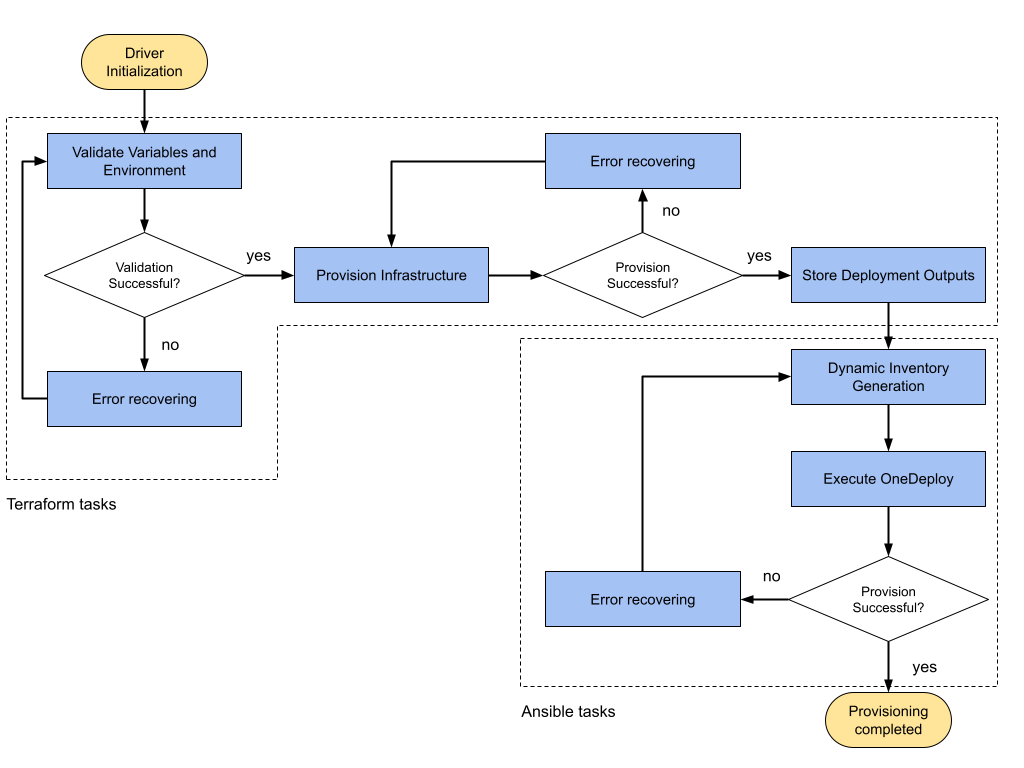
- Validate Variables and Environment: As the first step, the OneForm server runs
terraform initandterraform planoperations. These commands ensure that the cloud provider credentials and provisioning variables are correct. Besides Terraform’s built-in validations, you can configure an optional extra validation layer using a local variable file namedvalidators.tf. This additional layer checks details like integer ranges, correct string formats, and membership in specific lists. For more information about this integrated validation system, refer to the Development Driver Guide. - Provision Infrastructure: Creates the necessary infrastructure resources on the cloud provider according to the configuration defined in the Terraform code by the driver.
- Capture Deployment Outputs: Upon successful provisioning, the outputs of the Terraform process described on the previous step are captured.
- Generate Dynamic Inventory: Once Terraform has completed the provisioning phase, the output data is used to build the Ansible inventory dynamically. This is achieved through a custom dynamic inventory plugin named
opennebula_formwhich already includes OpenNebula packages, and interprets a Jinja-based template defined within the driver. The plugin connects to the OpenNebula database to fetch relevant deployment information and to generate a structured inventory tailored to the current Provision. - Execute Ansible Configuration (OneDeploy): With the inventory in place, Ansible proceeds to execute a set of playbooks provided by the OneDeploy framework. These playbooks configure the provisioned Hosts according to OpenNebula requirements, installing necessary components, adjusting system parameters, and registering the resources within OpenNebula as managed entities. This phase finalizes the infrastructure setup, making each resource fully integrated and operational within the OpenNebula orchestration workflow.
Additionally, with the error recovering step, the system captures the error and marks the affected Provision accordingly in OpenNebula if a failure occurs during either the provisioning with Terraform or Ansible configuration phases. While automatic rollback is not enforced by default, drivers may implement partial recovery logic, especially Ansible playbooks such as cleaning up failed resources or tasks.
Data Model
The driver metadata in OneForm is primarily defined through the provider.yaml file. This file includes the following basic information such as name, descripton or Fireedge related configuration along with a section containing optional metadata for web clients.
Apart from this static data, user inputs required for provisioning are not stored in the provider.yaml file. Instead, they are dynamically extracted from the driver’s Ansible and Terraform configurations. These inputs are grouped as follows:
- Provider Credential Values: Extracted from the
provider.tffile, these include authentication details such as API keys, secrets, and region-specific parameters necessary for Terraform to access the cloud provider. - Terraform Inputs: General infrastructure parameters are pulled from the
variables.tffile. These define things like instance types, availability zones, and network configuration, which are used to build the infrastructure plan. - Deployment-specific Inputs: For each type of Provision supported by the driver, custom input fields are declared in each configuration template metadata using YAML format. This allows drivers to define dynamic forms tailored to different deployment profiles, like SSH Cluster and HCI Cluster, enriching the provisioning interface without hardcoding values.
Networking Model
In terms of networking configuration, OneForm driver architecture distinguishes between private and public networks. Private networks are created and configured using OneDeploy Ansible playbooks. These playbooks rely on the dynamically generated inventory to set up all necessary networks for the Provision, including Host-level configurations such as bridges or VXLANs. For public networks, the driver structure implements a modular approach to manage IP address allocation through two specialized network drivers: the Elastic driver and the IPAM (IP Address Management) driver. These components are integrated into each P driver and abstract the way IP addresses are requested, assigned, and managed for provisioned resources:
- Elastic Driver: This driver is responsible for requesting public IP addresses directly from the cloud provider. It is typically invoked during the creation of a Virtual Network in OpenNebula when the network source is set to Elastic (
vnmad = elastic). In this scenario, the Elastic driver script dynamically provisions one or more public IPs, associates them with the appropriate cloud resources, and handles their release when no longer needed. These public IPs can then be used by Virtual Networks in OpenNebula to enable external connectivity for Virtual Machines and the services running on them. - IPAM Driver: This driver manages IP address assignment during Virtual Machine instantiation using OpenNebula’s Virtual Network Manager. When a Virtual Machine is deployed, OpenNebula triggers the corresponding IPAM scripts. These scripts interact with the cloud provider’s networking services to assign internal IPs to each Virtual Machine according to the configuration of the Virtual Network.
GIVE FEEDBACK
Was this resource helpful?
Glad to hear it
Sorry to hear that