LVM (File Mode) SAN Datastore
In this setup, disk images are stored in file format, such as raw and qcow2, in the Image Datastore, and then dumped into a LVM Logical Volume in the SAN when a Virtual Machine is created. The image files are transferred from Frontend to Hosts through the SSH protocol. Additionally, enable LVM Thin to support creating thin snapshots of the VM disks.
How Should I Read This Chapter
Before performing the procedures outlined in this chapter you must configure access to the SAN following one of the setup guides in the LVM Overview section.
Hypervisor Configuration
First we need to configure hypervisors for LVM operations over the shared SAN storage.
Hosts LVM Configuration
Prerequisites:
- LVM2 must be available on Hosts.
lvmetadmust be disabled. Set this parameter in/etc/lvm/lvm.conf:use_lvmetad = 0, and disable thelvm2-lvmetad.serviceif running.oneadminneeds to belong to thediskgroup.- All the nodes need to have access to the same LUNs.
In case of rebooting the virtualization Host, the volumes need to be activated to have them available for the hypervisor again. There are two possibilities:
- If the node package is installed, they will be automatically activated by the
/etc/cron.d/opennebula-nodecron file. - Otherwise, manual activation will be required. For each volume device of the Virtual Machines running on the Host before the reboot, run
lvchange -K -ay $DEVICE. You can also run on the Host the activation script/var/tmp/one/tm/fs_lvm_ssh/activate, located in the remote scripts.
Virtual Machine disks are symbolic links to the block devices. However, additional VM files like checkpoints or deployment files are stored under /var/lib/one/datastores/<id>. Be sure that enough local space is present.
Front-end Configuration
The Front-end needs to be configured as it’s described in the corresponding section of either Everpure, NetApp or Generic SAN depending on the SAN type you have.
OpenNebula Configuration
To interface with the SAN, create the two required OpenNebula datastores: Image and System. Both of them use the fs_lvm_ssh transfer driver (TM_MAD).
Create System Datastore
To create a new SAN/LVM System Datastore, you need to set the following (template) parameters:
| Attribute | Description |
|---|---|
NAME | Name of the Datastore |
TYPE | SYSTEM_DS |
TM_MAD | fs_lvm_ssh |
DISK_TYPE | BLOCK (used for volatile disks) |
BRIDGE_LIST | Front-end will use hosts in the list to proxy SAN operations |
For example:
> cat ds_system.conf
NAME   = lvm_system
TM_MAD = fs_lvm_ssh
TYPE   = SYSTEM_DS
DISK_TYPE = BLOCK

> onedatastore create ds_system.conf
ID: 100
Afterwards, a LVM VG needs to be created in the shared LUN for the system datastore with the
following name: vg-one-<system_ds_id>. This step just needs to be done once, either in one host,
or the front-end if it has access. This VG is where the actual VM images will be located at runtime,
and OpenNebula will take care of creating the LVs (one for each VM disk). For example, assuming
/dev/mapper/mpatha is the LUN (iSCSI/multipath) block device:
# pvcreate /dev/mapper/mpatha
# vgcreate vg-one-100 /dev/mapper/mpatha
Create Image Datastore
To create a new LVM Image Datastore, you need to set following (template) parameters:
| Attribute | Description |
|---|---|
NAME | Name of Datastore |
TYPE | IMAGE_DS |
DS_MAD | fs |
TM_MAD | fs_lvm_ssh |
DISK_TYPE | BLOCK |
LVM_THIN_ENABLE | (default: NO) YES to enable LVM Thin functionality (RECOMMENDED). |
The following example illustrates the creation of an LVM Image Datastore:
> cat ds_image.conf
NAME = lvm_image
DS_MAD = fs
TM_MAD = fs_lvm_ssh
DISK_TYPE = "BLOCK"
TYPE = IMAGE_DS
LVM_THIN_ENABLE = yes
SAFE_DIRS="/var/tmp /tmp"

> onedatastore create ds_image.conf
ID: 101
Front-end setup (Image Datastore)
The OpenNebula Front-end will keep the images used in the newly created Image Datastore in its
/var/lib/one/datastores/<datastore_id>/ directory. The simplest case will just use the local
storage in the Front-end, but you can mount any storage medium in that directory to support more
advanced scenarios, such as sharing it via NFS in a Front-end HA setup or even using another LUN
in the same SAN to keep everything in the same place. Here are some (non-exhaustive) examples of
typical setups for the image datastore:
Option 1: image datastore local to frontend. Assuming the image datastore has ID 100:
# mkdir -p /var/lib/one/datastores/100/
# chown oneadmin:oneadmin /var/lib/one/datastores/100/
Option 2: image datastore in NFS. Assuming the image datastore has ID 100, and nfs-server exposes
a share /srv/path_to_share:
# echo "nfs-server:/srv/path_to_share /var/lib/one/datastores/100/ nfs4 defaults 0 2" >> /etc/fstab
# mount /var/lib/one/datastores/100/
# chown oneadmin:oneadmin /var/lib/one/datastores/100/
Option 3: image datastore in LVM. Assuming the image datastore has ID 100, and /dev/sdb contains
some block device (either local to frontend, or SAN):
# pvcreate /dev/sdb
# vgcreate image-vg /dev/sdb
# lvcreate -l 100%FREE -n image-lv image-vg
# mkfs.ext4 /dev/image-vg/image-lv
# mkdir -p /var/lib/one/datastores/100/
# echo "/dev/image-vg/image-lv /var/lib/one/datastores/100/ ext4 defaults 0 2" >> /etc/fstab
# mount /var/lib/one/datastores/100/
# chown oneadmin:oneadmin /var/lib/one/datastores/100/
vg-one-<dsid> will need to be created for the image datastore,
that’s only required for the system one.LVM Thin
You have the option to toggle the LVM Thin functionality with the LVM_THIN_ENABLE attribute in the
Image Datastore. It is recommended that you enable this mode, as it allows some operations that
are not possible to do in the standard, non-thin mode:
- Creation of thin snapshots
- Consistent live backups
LVM_THIN_ENABLE attribute can only be modified while there are no images on the datastore.You can take a look at the Datastore Internals section for more info about the differences in thin and non-thin operation.
Driver Configuration
By default the LVM driver will zero any LVM volume so that VM data cannot leak to other instances. However, this process takes some time and may delay the deployment of a VM. The behavior of the driver can be configured in the file /var/lib/one/remotes/etc/tm/fs_lvm/fs_lvm.conf, in particular:
| Attribute | Description |
|---|---|
ZERO_LVM_ON_CREATE | Zero LVM volumes when they are created/resized (default: yes) |
ZERO_LVM_ON_DELETE | Zero LVM volumes when VM disks are deleted (default: yes) |
DD_BLOCK_SIZE | Block size for dd operations (default: 64kB) |
Example:
#  Zero LVM volumes on creation or resizing
ZERO_LVM_ON_CREATE=no

#  Zero LVM volumes on delete, when the VM disks are disposed
ZERO_LVM_ON_DELETE=yes

#  Block size for the dd commands
DD_BLOCK_SIZE=32M
The following attributes can be set in /var/lib/one/remotes/etc/datastore/datastore.conf:
SUPPORTED_FS: Comma-separated list with every filesystem supported for creating formatted datablocks.FS_OPTS_<FS>: Options for creating the filesystem for formatted datablocks. Can be set for each filesystem type.
SUPPORTED_FS list make sure that the corresponding mkfs.<fs_name> command is available in all Hosts including Front-end and hypervisors. If an unsupported FS is used by the user the default one will be used.Datastore Internals
Images are stored as regular files (under the usual path: /var/lib/one/datastores/<id>) in the Image Datastore, but they will be dumped into a Logical Volumes (LV) upon Virtual Machine creation. The Virtual Machines will run from Logical Volumes in the Host.
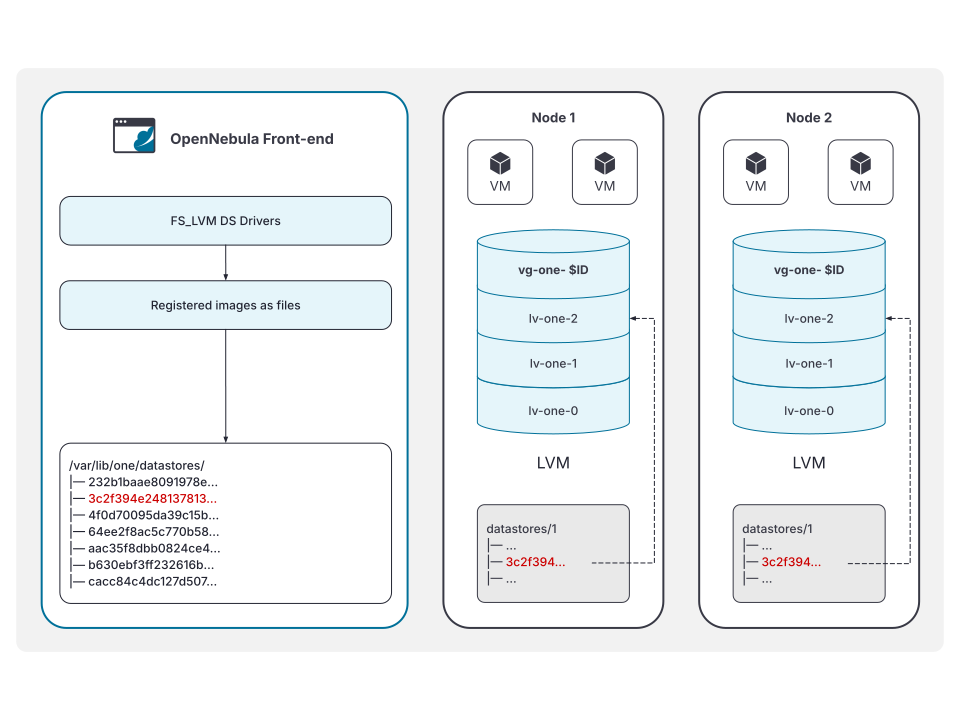
This is the recommended driver to be used when a high-end SAN is available. The same LUN can be exported to all the Hosts while Virtual Machines will be able to run directly from the SAN.
For example, consider a system with two Virtual Machines (9 and 10) using a disk, running in an LVM Datastore, with ID 0. The Hosts have configured a shared LUN and created a volume group named vg-one-0. The layout of the Datastore would be:
# lvs
  LV          VG       Attr       LSize Pool Origin Data%  Meta%  Move
  lv-one-10-0 vg-one-0 -wi------- 2.20g
  lv-one-9-0  vg-one-0 -wi------- 2.20g
LVM Thin Internals
In this mode, every launched VM will allocate a dedicated Thin Pool, containing one Thin LV per disk. So, a VM (with id 11) with two disks would be instantiated as follows:
# lvs
  LV              VG       Attr       LSize   Pool            Origin Data%  Meta%  Move Log Cpy%Sync Convert
  lv-one-11-0     vg-one-0 Vwi-aotz-- 256.00m lv-one-11-pool         48.44
  lv-one-11-1     vg-one-0 Vwi-aotz-- 256.00m lv-one-11-pool         48.46
  lv-one-11-pool  vg-one-0 twi---tz-- 512.00m                        48.45  12.60
The pool would be the equivalent to a typical LV, and it detracts its total size from the VG. On the other hand, per-disk Thin LVs are thinly provisioned and blocks are allocated in their associated pool.
Thin LVM snapshots are just a special case of Thin LV, and can be created from a base Thin LV instantly and consuming no extra data, as all of their blocks are shared with its parent. From that moment, changed data on the active parent will be written in new blocks on the pool and so will start requiring extra space as the “old” blocks referenced by previous snapshots are kept unchanged.
Let’s create a couple of snapshots over the first disk of the previous VM. As you can see, snapshots are no different from Thin LVs at the LVM level:
# lvs
  LV              VG       Attr       LSize   Pool            Origin       Data%  Meta%  Move Log Cpy%Sync Convert
  lv-one-11-0     vg-one-0 Vwi-aotz-- 256.00m lv-one-11-pool               48.44
  lv-one-11-0_s0  vg-one-0 Vwi---tz-k 256.00m lv-one-11-pool  lv-one-11-0
  lv-one-11-0_s1  vg-one-0 Vwi---tz-k 256.00m lv-one-11-pool  lv-one-11-0
  lv-one-11-1     vg-one-0 Vwi-aotz-- 256.00m lv-one-11-pool               48.46
  lv-one-11-pool  vg-one-0 twi---tz--   1.00g                              24.22  12.70
For more details about the inner workings of LVM, please refer to the lvmthin(7) main page.
GIVE FEEDBACK
Was this resource helpful?
Glad to hear it
Sorry to hear that