SAN/LVM: Everpure setup
This setup assumes you are using a Everpure FlashArray with iSCSI and want to use it as a backend for one of OpenNebula’s LVM datastore options. The configuration uses standard volume and Host mappings. If you are familiar with the Everpure interface, create the required resources as desired.
Everpure Configuration
Host and Host Group
For each of the Hosts and Front-end you’ll need to either gather or define their iSCSI Initiator Name. If you have already started iscsid at least once on the machine it should have a name generated in /etc/iscsi/initiatorname.iscsi. If you would prefer to define it, you can modify that file’s contents to something like InitiatorName=iqn.2024-01.com.example.pure:some.host.id then restarting iscsid (and then reconnect any active iscsi sessions, if already connected). Each name must be unique.
Navigate to Storage → Hosts in the Everpure dashboard. For each OpenNebula Host and Front-end, select the + in the top right of the Hosts card and set a Name that clearly identifies the Host, and leave the Personality as None. You can also use the “Create Multiple…” if you have many Hosts.
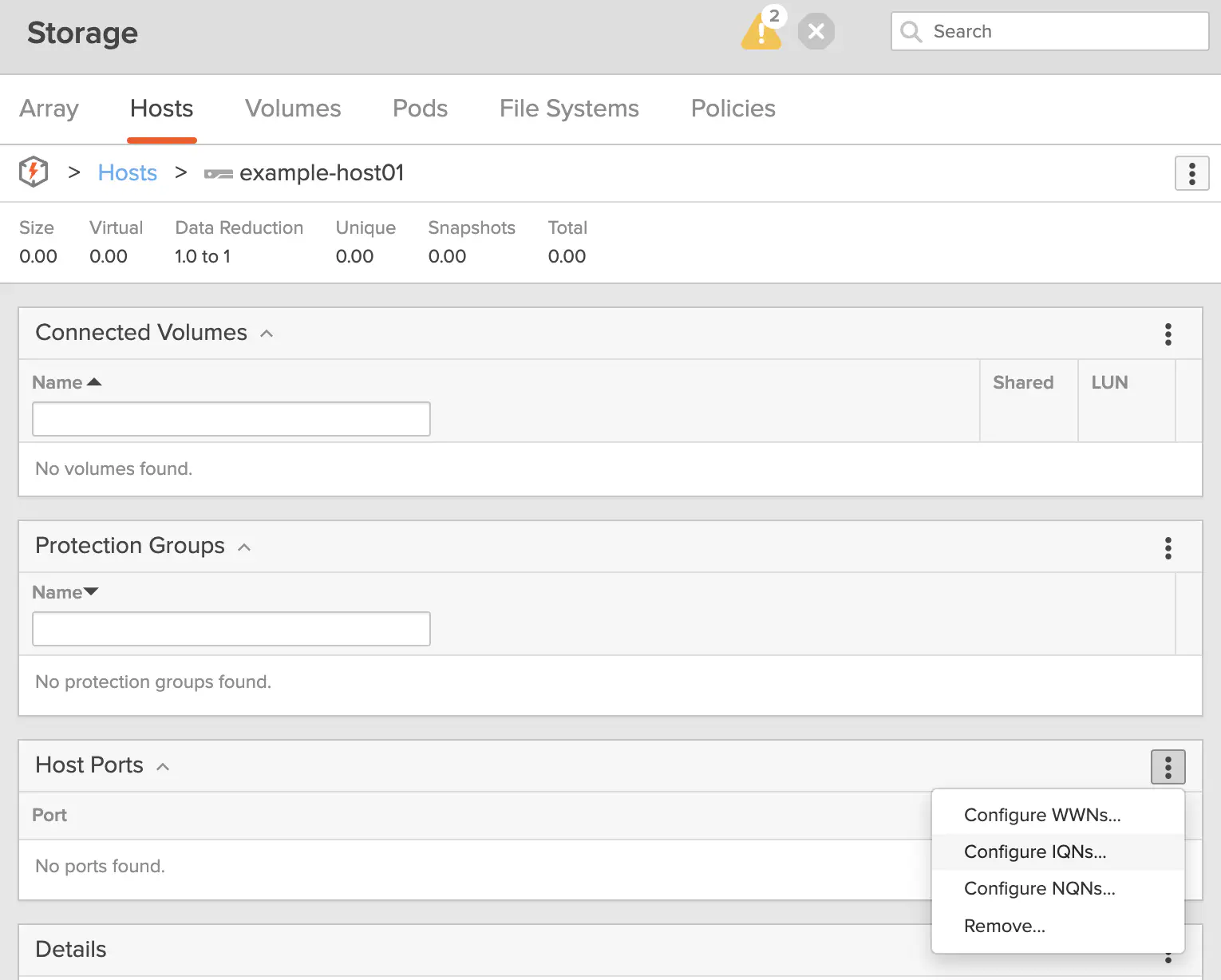
Once each Host is populated in the list, click into each of them and then on the Host Ports card, select the Menu (⋮) button and select Configure IQNs. Paste the initiator name from /etc/iscsi/initiatorname.iscsi from the proper Host here.
Once all Hosts have been added and their IQNs have been inserted, create a Host Group by navigating to Storage → Hosts, then on the Host Groups card select the + button and provide an identifiable name for it.
Then, click into the Host group and on the Member Hosts card there click the Menu (⋮) button and select Add…. Here, you can select all of the Hosts you had created previously, then click Add.
Volume Creation and Connection
From the Everpure dashboard, navigate to Storage → Volumes. Here, in the top right of the Volumes card, select +.
Give the volume a name (this can just be the name of your OpenNebula LVM volume group or something descriptive), and set the desired size. Thin provisioning is always enabled on Everpure, so there’s no need to configure anything extra.
You don’t need to configure snapshots, protection policies, or replication unless you’re doing something more advanced. For basic OpenNebula integration, just create the Volume and leave everything else at defaults.
Click on the volume you just created, and on the Connected Host Groups card, click the Menu (⋮) button and click Connect…. Select your Host group (or individual Hosts if you’re not using a group), and confirm the connection.
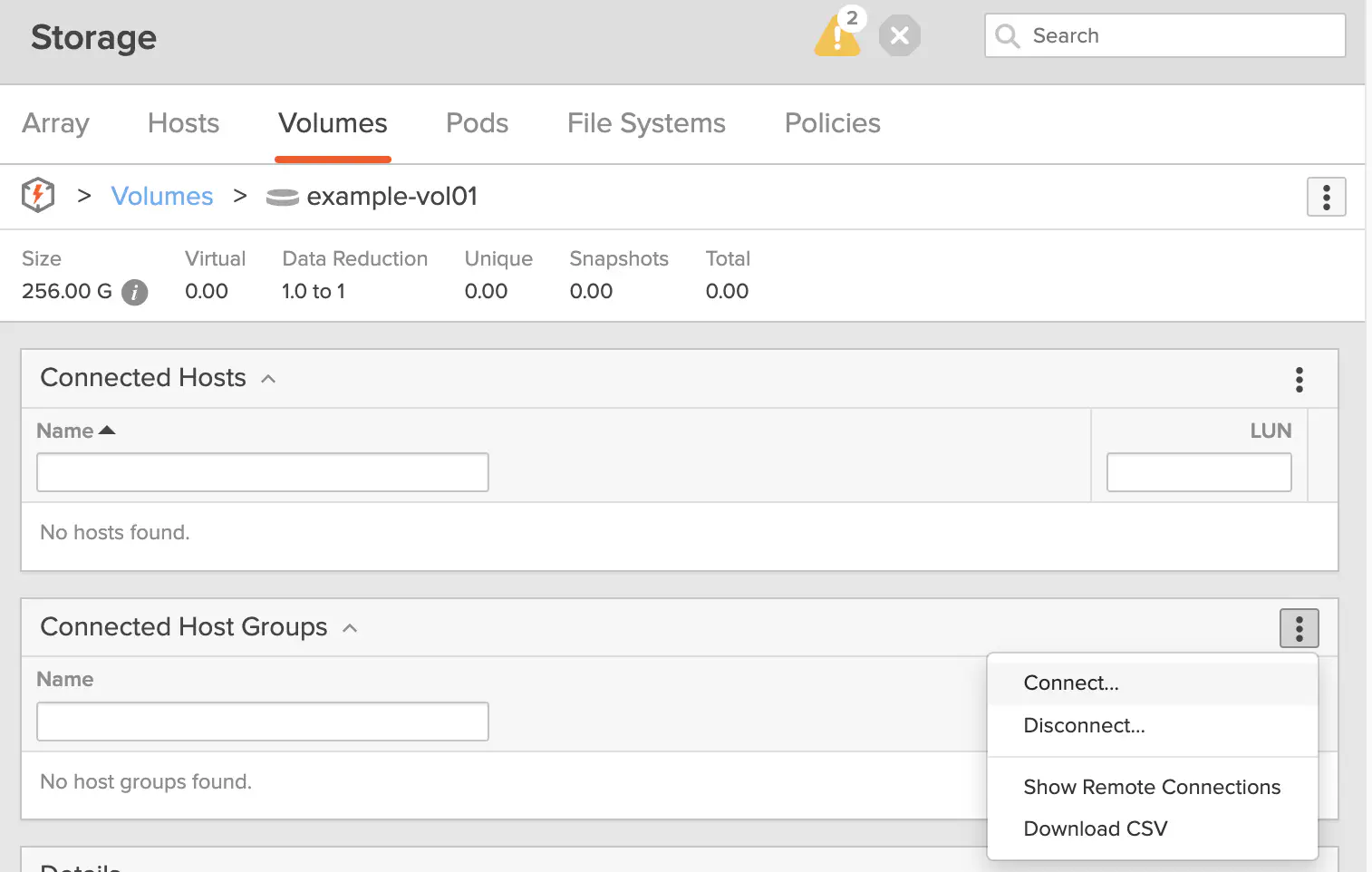
Once connected, the volume will be exposed to all Hosts in the group. You can update the Host group if you add/remove Hosts from your OpenNebula installation.
After this is complete, the volume is visible on your OpenNebula Hosts after re-scanning iSCSI sessions via iscsiadm -m session --rescan, and finding the new device with multipath -ll and lsblk. Proceed with the LVM volume group creation and OpenNebula LVM Datastore Setup as usual.
Front-end and Hosts Configuration
The Front-end and Hosts of OpenNebula should have their /etc/multipath.conf to include these sections:
defaults {
        polling_interval       10
}

devices {
    device {
        vendor                      "NVME"
        product                     "Pure Storage FlashArray"
        path_selector               "queue-length 0"
        path_grouping_policy        group_by_prio
        prio                        ana
        failback                    immediate
        fast_io_fail_tmo            10
        user_friendly_names         no
        no_path_retry               0
        features                    0
        dev_loss_tmo                60
    }
    device {
        vendor                   "PURE"
        product                  "FlashArray"
        path_selector            "service-time 0"
        hardware_handler         "1 alua"
        path_grouping_policy     group_by_prio
        prio                     alua
        failback                 immediate
        path_checker             tur
        fast_io_fail_tmo         10
        user_friendly_names      no
        no_path_retry            0
        features                 0
        dev_loss_tmo             600
    }
}
If you have an existing multi-path configuration file merge them together if possible. Ensure you restart your multipath daemon to pick up the changes: systemctl restart multipathd
GIVE FEEDBACK
Was this resource helpful?
Glad to hear it
Sorry to hear that