OpenNebula NVIDIA Fabric Manager
Introduction
The OpenNebula NVIDIA® Fabric Manager integration provides a complete solution for managing NVIDIA NVSwitch fabric within a cloud environment.
NVIDIA Shared NVSwitch Virtualization Model
The OpenNebula integration with Fabric Manager integration follows the NVIDIA Shared NVSwitch Virtualization Model. This model uses a Service VM in each hypervisor for managing the NVSwitches. The NVSwitches are added to the Service VM as PCI passthrough devices to configure the selected GPU partitioning. The Guest VMs are configured with PCI passthrough for the GPUs only, without any visibility of the NVSwitches. See the reference architecture in the image below.
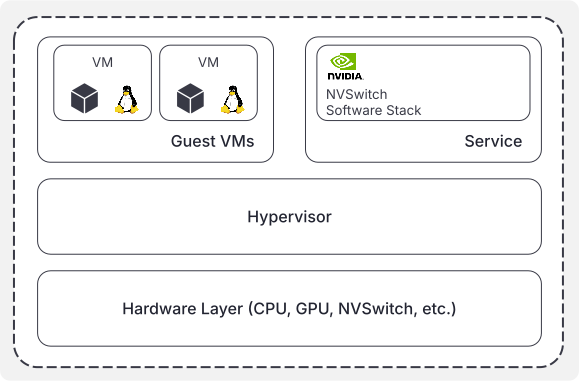
These are the key components of the NVIDIA Shared NVSwitch Virtualization Model:
- Service VM (Fabric Manager VM): a persistent, minimal Virtual Machine runs on each KVM host.
- PCI Passthrough: the NVSwitch hardware devices are passed directly to this Service VM. The GPUs are passed directly to guests (workload) VMs.
- Fabric Manager: the NVIDIA Fabric Manager and associated NVIDIA tools run inside the Service VM, allowing it to dynamically reconfigure and manage the NVSwitches.
For additional information about NVIDIA Shared NVSwitch Virtualization Model, refer to the official NVIDIA Fabric Manager documentation.
OpenNebula FabricManager Architecture
OpenNebula implements the NVIDIA Shared NVSwitch Virtualization Model through a two-part system designed for automation and centralized management:
Host Component (
opennebula-kvm-nodeEE package): the Enterprise Edition of the package is installed on each KVM host that contains NVSwitch devices. It provides asystemdservice that manages a minimal, self-contained VM (one-fabricmanager). This VM is given direct, secure access to the NVSwitch hardware via PCI passthrough and contains the necessary NVIDIA tools likenv-partitionerandnvswitch-auditto manage the hardware.The host component also includes a monitoring probe that runs periodically. It queries the Fabric Manager VM to get the current NVSwitch partitions and maps the logical GPU module IDs to the physical PCI addresses on the host. This information (
NVSWITCH_PARTITION) is reported to OpenNebula, making the partition status and the GPU topology visible in the host’s monitoring data for scheduling and management.Frontend CLI (
onefabric): the primary user interface for the tool, managed from the OpenNebula frontend. It acts as a central point of control for the entire cluster. When you run a command, the tool connects to the relevant KVM hosts and execute commands inside the Fabric Manager VM using the QEMU guest agent. This allows you, as an administrator, to manage the NVSwitch hardware across all hosts from a single console.
The OpenNebula NVIDIA Fabric Manager Integration allows administrators:
- To dynamically partition NVSwitch devices across compute hosts.
- To ensure multi-GPU VMs receive full NVLink bandwidth in a multi-tenant environment.
- To monitor the status and topology of NVSwitch partitions in OpenNebula.
Requirements
KVM Host requirements:
- NVIDIA NVSwitch Hardware: required on the KVM hosts.
- Host Software Component: the
opennebula-kvm-nodeEE package must be installed on all NVSwitch-equipped hosts. - VFIO-PCI Drivers: the
vfio-pcidriver must be enabled and loaded for the NVSwitch and GPU devices to allow PCI passthrough to the Service VM. - Service VM Image: the required Fabric Manager VM image is handled and downloaded automatically during service startup. By default this requires Internet access from the hypervisors.
Installation and Configuration
Host Preparation and Component Installation
To begin the installation and configuration, verify these prerequisites:
KVM Node Package: ensures that the
opennebula-kvm-nodeEE package is installed on every KVM host that contains NVSwitch devices. This package contains theopennebula-fabricmanagerservice.NVSwitch PCI passthrough Setup: the NVSwitch devices must be prepared for PCI passthrough using the vfio-pci driver. Configure these devices at OpenNebula deployment time using one-deploy; check here for instructions. If this is not done during deployment, it is possible to manually configure the NVSwitches to use the virtio-pci driver by following the “Hypervisor Configuration” section from NVIDIA GPU Passthrough.
Once you have validated the prerequisites, start OpenNebula FabricManager service: the opennebula-fabricmanager service on the host is disabled by default, as it is designed to be started and stopped on demand or managed by you as the OpenNebula administrator.
To start the service, run the following command on each virtualization node:
nvidia@opennebula-gpu01:~$ sudo systemctl start opennebula-fabricmanager.service
When you start OpenNebula FabricManager on each virtualization node, the service executes pre-start scripts to prepare the VM environment and define the `one-fabricmanager domain. Then, it starts the VM.
During the start process the service will perform attempts to download the Fabric Manager VM image from a public URL. If you are working on an air-gapped installation, edit /etc/onefabricmanager.conf on each node in order to set a custom accessible URL with the image hosted.
Validation (Post-Start)
opennebula-fabricmanager as a service startup process performs validation steps:
- NVSwitch Detection: the service scans for NVSwitch devices (Vendor: 10de, Devices: 22a3) and confirms the vfio-pci driver is in use. These devices are automatically added to the
one-fabricmanagerVM. If the devices have different IDs, add them into the configuration file on/etc/onefabricmanager.confon the hosts nodes.
Example output during start:
nvidia@opennebula-gpu01:~$ systemctl status opennebula-fabricmanager
● opennebula-fabricmanager.service - OpenNebula FabricManager Service
Loaded: loaded (/usr/lib/systemd/system/opennebula-fabricmanager.service; disabled; preset: enabled)
Active: active (exited) since Sat 2025-11-15 09:08:27 UTC; 12s ago
Process: 498303 ExecStartPre=/usr/lib/one/download-image.sh (code=exited, status=0/SUCCESS)
Process: 498304 ExecStartPre=/usr/bin/test -f /etc/one/one-fabricmanager.xml (code=exited, status=0/SUCCESS)
Process: 498307 ExecStartPre=/usr/lib/one/prepare_vm_xml.sh (code=exited, status=0/SUCCESS)
Process: 500092 ExecStartPre=/bin/bash -c virsh -c qemu:///system dominfo one-fabricmanager >/dev/null 2>&1 || virsh -c qemu:///system define >
Process: 500112 ExecStart=/usr/bin/virsh -c qemu:///system start one-fabricmanager (code=exited, status=0/SUCCESS)
Main PID: 500112 (code=exited, status=0/SUCCESS)
CPU: 5.063s
Nov 15 09:08:18 opennebula-gpu01 download-image.sh[498303]: Image already exists at /var/lib/one/fabricmanager/service_FabricManager-7.0.0>
Nov 15 09:08:18 opennebula-gpu01 prepare_vm_xml.sh[498307]: Scanning for NVSwitch devices (Vendor: 10de, Devices: 22a3)...
Nov 15 09:08:18 opennebula-gpu01 prepare_vm_xml.sh[498307]: [OK] Found valid NVSwitch: 0000:07:00.0 (Driver: vfio-pci)
Nov 15 09:08:18 opennebula-gpu01 prepare_vm_xml.sh[498307]: [OK] Found valid NVSwitch: 0000:08:00.0 (Driver: vfio-pci)
Nov 15 09:08:18 opennebula-gpu01 prepare_vm_xml.sh[498307]: [OK] Found valid NVSwitch: 0000:09:00.0 (Driver: vfio-pci)
Nov 15 09:08:18 opennebula-gpu01 prepare_vm_xml.sh[498307]: [OK] Found valid NVSwitch: 0000:0a:00.0 (Driver: vfio-pci)
Nov 15 09:08:23 opennebula-gpu01 prepare_vm_xml.sh[498307]: Generated final XML at /var/lib/one/fabricmanager/one-fabricmanager.xml
Nov 15 09:08:23 opennebula-gpu01 bash[500092]: Domain 'one-fabricmanager' defined from /var/lib/one/fabricmanager/one-fabricmanager.xml
Nov 15 09:08:27 opennebula-gpu01 virsh[500112]: Domain 'one-fabricmanager' started
Nov 15 09:08:27 opennebula-gpu01 systemd[1]: Finished opennebula-fabricmanager.service - OpenNebula FabricManager Service.
After opennebula-fabricmanager is running, check the artifacts generated by the service:
oneadmin@opennebula-gpu01:~$ ls -l fabricmanager/
total 3543304
-rw-r--r-- 1 oneadmin oneadmin       2135 Nov 15 09:08 one-fabricmanager.xml
-rw-r--r-- 1 oneadmin oneadmin 1493499904 Nov 15 09:11 service_FabricManager-<version>.qcow2
The generated artifacts include:
- one-fabricmanager.xml: the libvirt Domain XML file that defines the configuration for the Fabric Manager Service VM named
one-fabricmanager. This XML includes essential settings like CPU, memory, and the PCI passthrough definitions that securely grant the VM direct access to the NVSwitch hardware devices on the KVM host. - service_FabricManager-
.qcow2 : the disk image in QCOW2 format for the Fabric Manager Service VM. It contains the minimal operating system, the NVIDIA Fabric Manager tools such as nv-partitioner and nvswitch-audit, as well as the necessary configuration files required for the VM to boot and manage the NVSwitch hardware.
- VM Running: execute
virsh listto see one-fabricmanager running as the Service VM.
Example:
oneadmin@opennebula-gpu01:~$ virsh list
...
 Id   Name                State
-----------------------------------
 10   one-fabricmanager   running
Optionally, configure this validation by using opennebula-fabricmanager.rb script on the host:
oneadmin@opennebula-gpu01:~$ /usr/lib/one/opennebula-fabricmanager.rb --status
Systemd service status:
● opennebula-fabricmanager.service - OpenNebula FabricManager Service
Loaded: loaded (/usr/lib/systemd/system/opennebula-fabricmanager.service; disabled; preset: enabled)
...
Nov 15 09:08:27 opennebula-gpu01 virsh[500112]: Domain 'one-fabricmanager' started

VM state (libvirt): running
Fabric Manager Usage
The OpenNebula NVIDIA Fabric Manager is intended to use via onefabric commands, the central point of control. The commands are remotely executed via SSH against the KVM hosts, interacting with the Fabric Manager VM through the QEMU guest agent.
The onefabric command remotely executes the /usr/lib/one/opennebula-fabricmanager.rb script available on the virtualization nodes. As an administrator, you can execute all commands from the host itself by directly using the mentioned script.
onefabric key commands:
onefabric list [--csv]: Lists NVSwitch partitions. Use--csvfor script-friendly output.onefabric activate <partition_id>: Activates a specific hardware partition.onefabric deactivate <partition_id>: Deactivates a specific hardware partition.onefabric audit: Runs thenvswitch-audittool inside the Fabric Manager VM.onefabric exec "<shell_command>": Executes an arbitrary shell command inside the Fabric Manager VM.
All commands include optional arguments:
--host <id/name>: targets a specific OpenNebula host ID or host name.--cluster <id/name>: targets all hosts within a specific cluster ID or cluster name.
If you do not specify any these parameters, the command is executed for all available hosts.
Example of Partitioning Configuration
- List available partitions on a host with the
onefabric listcommand:
onefabric list --host 0
Output shows partitions, GPU Module IDs, and current STATUS (e.g., INACTIVE):

Partition ID   Number of GPUs GPU Module ID            Max NVLinks/GPU     STATUS
--------------------------------------------------------------------------------
0              8              1, 2, 3, 4, 5, 6, 7, 8   18                  INACTIVE
1              4              1, 2, 3, 4               18                  INACTIVE
...
- Activate multiple partitions with the
onefabric activatecommand. As an example: split the 8 GPUs into two 4-GPU groups on host ID 0:
oneadmin@opennebula-gpu01:~$ onefabric activate 1 --host 0
Executing on 1 host(s).
Command: /usr/lib/one/opennebula-fabricmanager.rb --activate 1

--- [Host 0: 172.16.0.106] (remote) ---
Executing inside FabricManager VM: nv-partitioner -o 1 -p '1'
Successfully connected to Fabric Manager at 127.0.0.1
Successfully sent activation request for partition 1


oneadmin@opennebula-gpu01:~$ onefabric activate 2 --host 0
Executing on 1 host(s).
Command: /usr/lib/one/opennebula-fabricmanager.rb --activate 2

--- [Host 0: 172.16.0.106] (remote) ---
Executing inside FabricManager VM: nv-partitioner -o 1 -p '2'
Successfully connected to Fabric Manager at 127.0.0.1
Successfully sent activation request for partition 2
- Verify the results:
4.1. Run the onefabric list command to see the new partitions:
oneadmin@opennebula-gpu01:~$ onefabric list --host 0
Executing on 1 host(s).
Command: /usr/lib/one/opennebula-fabricmanager.rb --list

--- [Host 0: 172.16.0.106] (remote) ---
Executing inside FabricManager VM: nv-partitioner -o 0
Successfully connected to Fabric Manager at 127.0.0.1
Total supported partitions: 15

Partition ID   Number of GPUs GPU Module ID            Max NVLinks/GPU     STATUS
--------------------------------------------------------------------------------
0              8              1, 2, 3, 4, 5, 6, 7, 8   18                  INACTIVE
1              4              1, 2, 3, 4               18                  ACTIVE
2              4              5, 6, 7, 8               18                  ACTIVE
3              2              1, 3                     18                  INACTIVE
4              2              2, 4                     18                  INACTIVE
...
4.2. Run onefabric audit to inspect additional details: the example depicts full 18-link connectivity for the active partitions 1 and 2.
oneadmin@opennebula-gpu01:~$ onefabric audit --host 0
Executing on 1 host(s).
Command: /usr/lib/one/opennebula-fabricmanager.rb --audit

--- [Host 0: 172.16.0.106] (remote) ---
Executing inside FabricManager VM: nvswitch-audit

GPU Reachability Matrix
GPU Physical Id      1  2  3  4  5  6  7  8
                  1 18 18 18 18  0  0  0  0
                  2 18 18 18 18  0  0  0  0
                  3 18 18 18 18  0  0  0  0
                  4 18 18 18 18  0  0  0  0
                  5  0  0  0  0 18 18 18 18
                  6  0  0  0  0 18 18 18 18
                  7  0  0  0  0 18 18 18 18
                  8  0  0  0  0 18 18 18 18
Monitoring
Partition Status Commands
The primary way to check the final operational state is using onefabric list and onefabric audit commands.
Monitoring Probe
The OpenNebula host component includes a periodic monitoring probe. This probe connects to the Fabric Manager VM to retrieve the current NVSwitch partitions and the mapping of logical GPU module IDs to physical PCI addresses.
This data is reported back to OpenNebula, making the partition status visible to the OpenNebula scheduler and management interface. The partition information is reported in the host’s monitoring data under the NVSWITCH_PARTITION attribute.
After activating one or more partitions, check them with onehost show. You will see the details in the host’s monitoring information, as in the example with Partitions 1 and 2, 4 GPUs each, in active status:
oneadmin@opennebula-gpu01:~$ onehost show 0
HOST 0 INFORMATION
ID : 0
NAME : 172.16.0.106
CLUSTER : default
STATE : MONITORED
IM_MAD : kvm
VM_MAD : kvm
LAST MONITORING TIME : 11/15 12:07:31

HOST SHARES
RUNNING VMS : 1
MEMORY
TOTAL : 2T
TOTAL +/- RESERVED : 2T
USED (REAL) : 154.2G
USED (ALLOCATED) : 32G
CPU
TOTAL : 22400
TOTAL +/- RESERVED : 22400
USED (REAL) : 224
USED (ALLOCATED) : 20800

LOCAL SYSTEM DATASTORE #0 CAPACITY
TOTAL: : 1.7T
USED: : 504.4G
FREE: : 1.3T

MONITORING INFORMATION
ARCH="x86_64"
CGROUPS_VERSION="2"
CPUSPEED="0"
HOSTNAME="opennebula-gpu01"
...
MODELNAME="Intel(R) Xeon(R) Platinum 8480C"
NVSWITCH_PARTITION=[
  NUM_GPUS="4",
  PARTITION_GPU_ADDR="0000:c3:00.0 0000:df:00.0 0000:d1:00.0 0000:9d:00.0",
  PARTITION_GPU_IDS="1 2 3 4",
  PARTITION_ID="1",
  PARTITION_STATUS="ACTIVE" ]
NVSWITCH_PARTITION=[
  NUM_GPUS="4",
  PARTITION_GPU_ADDR="0000:43:00.0 0000:61:00.0 0000:52:00.0 0000:1b:00.0",
  PARTITION_GPU_IDS="5 6 7 8",
  PARTITION_ID="2",
  PARTITION_STATUS="ACTIVE" ]
Upon activating or deactivating an NVSwitch partition, the probe requires some time to run as defined in /etc/one/monitord.conf. This means that the information is subject to a delayed update. If you want to force the execution, run the onehost forceupdate command against the specific host.
GIVE FEEDBACK
Was this resource helpful?
Glad to hear it
Sorry to hear that