Kubernetes Cluster Monitoring and Troubleshooting
OneKS uses event-based monitoring to follow VM provisioning, deprovisioning, and lifecycle changes. Its current visibility model is centered on lifecycle state, events, and logs.
Event-driven monitoring is implemented through OpenNebula VM and dependency event watchers. It tracks VM allocation and state changes, seed VM state changes, and dependency lifecycle changes.
K8s Cluster States
OneKS exposes the following K8s Cluster states:
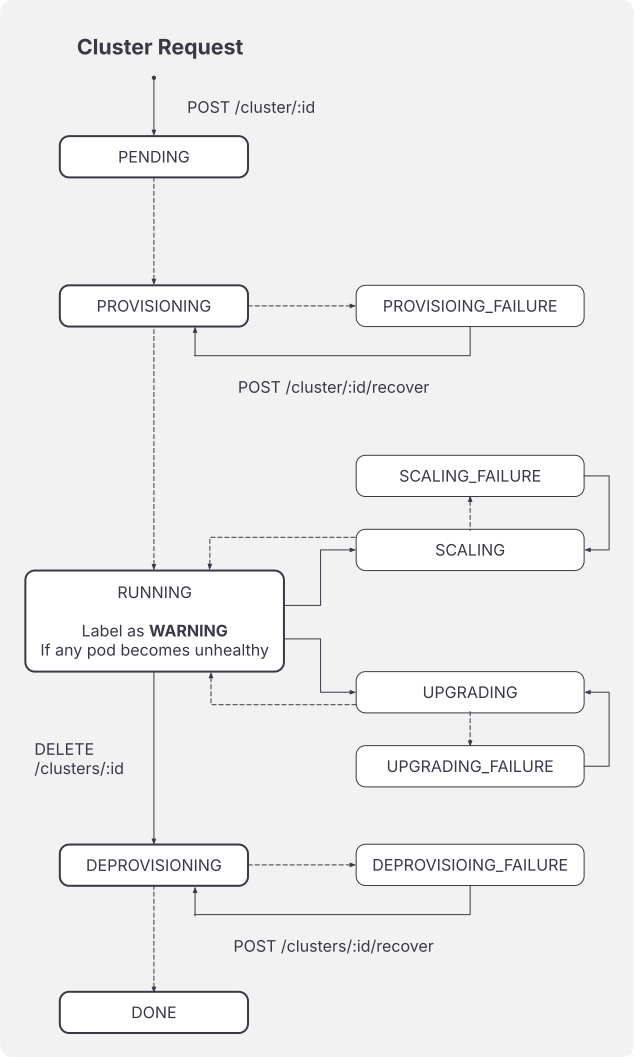
| State | Description |
|---|---|
PENDING | A K8s Cluster document has been created. |
PROVISIONING | Control-plane provisioning has started. |
RUNNING | All expected groups are running. |
SCALING | A node group is being added, removed, or resized. |
UPGRADING | The K8s Cluster version is being upgraded. |
DEPROVISIONING | The K8s Cluster resources are being deleted. |
WARNING | One or more groups are inconsistent or degraded. |
DONE | K8s Cluster deprovisioning has completed. |
PROVISIONING_FAILURE | Provisioning failed. |
SCALING_FAILURE | Scaling failed. |
UPGRADING_FAILURE | Upgrade failed. |
DEPROVISIONING_FAILURE | Deprovisioning failed. |
Node Group States
OneKS exposes the following group states:
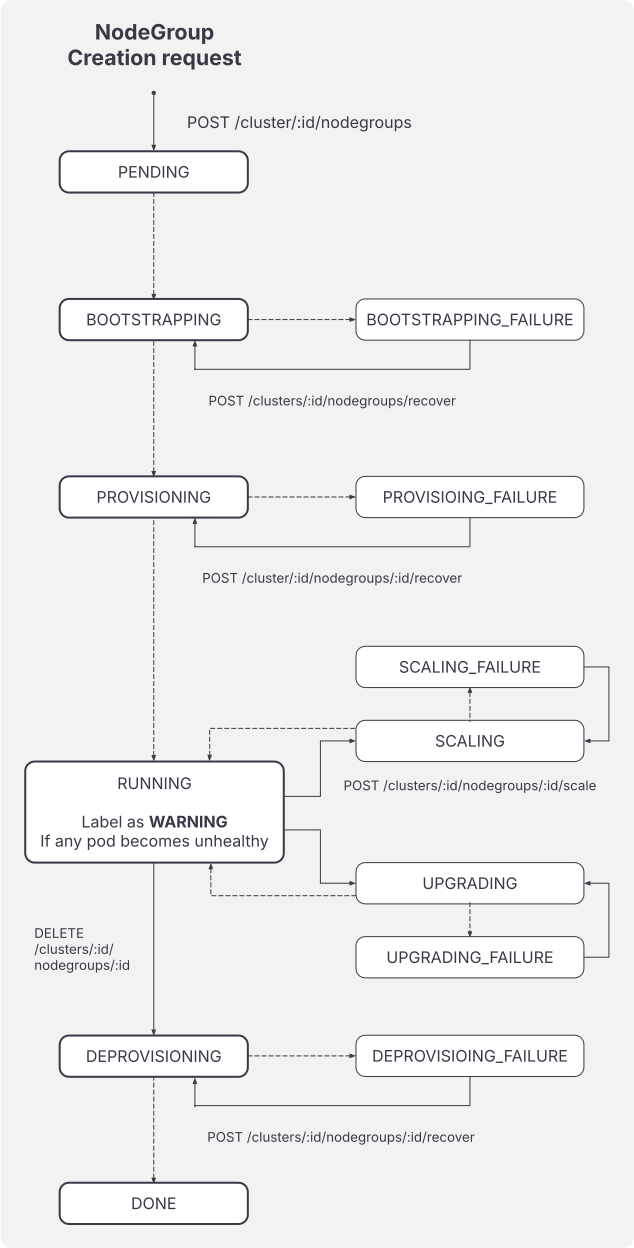
| State | Description |
|---|---|
PENDING | The group document exists. |
BOOTSTRAPPING | Dependencies are being prepared. |
PROVISIONING | Kubernetes resources or VMs are being created. |
RUNNING | Expected VMs exist and are running. |
SCALING | Target size is changing. |
UPGRADING | The group is being upgraded. |
DEPROVISIONING | Group resources are being removed. |
WARNING | One or more associated VMs or dependencies are degraded. |
DONE | Group deprovisioning has completed. |
BOOTSTRAPPING_FAILURE | Dependency preparation failed. |
PROVISIONING_FAILURE | Provisioning failed. |
SCALING_FAILURE | Scaling failed. |
UPGRADING_FAILURE | Upgrade failed. |
DEPROVISIONING_FAILURE | Deprovisioning failed. |
Reconciliation Rules
OneKS continuously reconciles the desired K8s Cluster state stored in OpenNebula documents with the observed state of the underlying groups, VMs, and dependencies. The K8s Cluster state is not updated in isolation, it is derived from the current lifecycle action and from the state of its control-plane and worker node groups.
| Rule | Behavior |
|---|---|
| Running condition | A K8s Cluster reaches RUNNING only when all expected groups are RUNNING. |
| Group degradation | A group in WARNING or a failure state may move the K8s Cluster to WARNING when the K8s Cluster resource still exists and the current action can continue being observed. |
| Action-specific failures | Group failures are mapped to the K8s Cluster failure state that matches the operation in progress, such as PROVISIONING_FAILURE, SCALING_FAILURE, UPGRADING_FAILURE, or DEPROVISIONING_FAILURE. |
| Control-plane bootstrap failure | Seed VM or dependency failures during control-plane bootstrap can surface as BOOTSTRAPPING_FAILURE on the control-plane group and K8s Cluster. |
| Deprovisioning completion | During deprovisioning, once the managed groups have been removed, the K8s Cluster reaches DONE and is removed from OneKS storage. |
| Terminal state | DONE is the terminal lifecycle state for a successfully deprovisioned K8s Cluster or node group. |
Operational constraints are also enforced during reconciliation:
| Constraint | Behavior |
|---|---|
| Node group creation | Node groups can be added only when the K8s Cluster is in an operational state and the control plane is running. |
| Node group warning | A node-group warning usually means that one or more associated VMs or dependencies are degraded, inconsistent, or not matching the expected state. |
| Control-plane scaling | The control plane does not support scale operations through the OneKS scale command. |
Troubleshooting Logs
OneKS provides two main log surfaces on the OpenNebula Front-end Host: service logs for the daemon itself, and lifecycle logs for each K8s Cluster.
Use the service logs when the OneKS server does not start, cannot connect to OpenNebula, fails to load configuration, or reports internal errors:
/var/log/one/oneks.log
/var/log/one/oneks.error
Use the per-cluster lifecycle logs when a specific K8s Cluster fails or stalls during provisioning, scaling, upgrade, recovery, or deletion:
/var/log/one/oneks/<cluster_id>.log
The CLI and API also expose the per-cluster lifecycle log. For daemon startup errors or configuration loading failures, use the service logs or the systemd journal for the OneKS service.
# Show the lifecycle log for one K8s Cluster
oneks logs cluster 42

# Follow the lifecycle log as new entries are written
oneks logs cluster 42 --follow

# Include all log lines available for the K8s Cluster
oneks logs cluster 42 --all

# Include all log lines and keep following new entries
oneks logs cluster 42 --all --follow
curl -u "$(cat /var/lib/one/.one/one_auth)" http://<oneks-server>:10780/api/v1/clusters/<cluster_id>/logs
Provisioning Troubleshooting
K8s Cluster provisioning can fail for different infrastructure or network-related reasons. In most cases, these failures surface as a timeout during provisioning and the K8s Cluster eventually moves to PROVISIONING_FAILURE. The following checks can help identify the most common causes.
OneGate is Not Properly Configured
OneKS relies on the seed VM to report progress and update OpenNebula resources during provisioning. If OneGate is not properly configured or the seed VM cannot reach the OneGate service, the seed VM cannot publish the expected updates back to OpenNebula. As a result, OneKS waits until the provisioning timeout is reached and the K8s Cluster enters PROVISIONING_FAILURE.
Check that the OneGate service is running on the OpenNebula Front-end:
systemctl status opennebula-gate
journalctl -u opennebula-gate
Also check the OneGate service logs:
tail -n 200 /var/log/one/onegate.log
tail -n 200 /var/log/one/onegate.error
Verify that the VM template used by the seed VM includes OneGate contextualization, and that the VM receives a valid ONEGATE_ENDPOINT and token through context. The VM must also have network connectivity to the OneGate endpoint.
For more information, refer to the OpenNebula OneGate Documentation.
VMs Cannot Access the Internet
During provisioning, the seed VM needs Internet access to download the required artifacts and images used to bootstrap and connect the Kubernetes nodes. If the seed VM or the target nodes cannot reach the Internet, provisioning may stall until the timeout is reached and the K8s Cluster moves to PROVISIONING_FAILURE.
From the affected VM, check basic network connectivity:
ping -c 3 8.8.8.8
Then check DNS resolution:
getent hosts opennebula.io
If IP connectivity works but DNS resolution fails, review the DNS configuration assigned to the VM. If both fail, review the router, gateway, NAT, and security group configuration of the public Virtual Network that the K8s Cluster has assigned.
For more information, refer to the OpenNebula Virtual Networks Documentation.
VMs Cannot Communicate Through the Private Networks
The seed VM must be able to reach the control-plane VM through the private K8s Cluster network. If the private VNet is not correctly configured, the seed VM may create the control-plane VM successfully but fail when trying to connect to it and pivot the management K8s Cluster.
This usually indicates an issue in the private network configuration, such as missing routing, incorrect address assignment, security group restrictions, or lack of connectivity between the seed VM and the Kubernetes node private IPs.
From the seed VM, check connectivity to the control-plane private IP:
ping -c 3 <control_plane_private_ip>
Check whether SSH is reachable:
nc -vz <control_plane_private_ip> 22
If the control-plane VM is reachable only through the K8s Cluster virtual router created by OneKS, connect through the router as a jump Host:
ssh -J root@<router_public_ip> root@<control_plane_private_ip>
If the private IP cannot be reached, inspect the associated OpenNebula Virtual Networks, leases, security groups, and virtual router configuration. Make sure that the seed VM and the control-plane VM are attached to the expected networks and that traffic between them is allowed.
For more information, see the OpenNebula Virtual Networks documentation.
Basic Kubernetes Troubleshooting
Kubernetes-level checks are Cluster-specific. Start by retrieving the kubeconfig for the target K8s Cluster:
oneks show cluster <cluster_id> --kubeconfig > kubeconfig
Then verify the Kubernetes node state:
KUBECONFIG=./kubeconfig kubectl get nodes -o wide
A healthy K8s Cluster should show the expected control-plane and worker nodes in a Ready state.
If one or more nodes are NotReady, identify the affected OneKS group and OpenNebula VM:
oneks show cluster <cluster_id>
oneks list nodegroups
oneks show nodegroup <nodegroup_id>
The OneKS output shows the VM IDs associated with the control-plane and each node group.
The OpenNebula Front-end cannot reach the Kubernetes node private network directly, connect through the K8s Cluster virtual router.
Identify the virtual router VM:
onevm list
Inspect the virtual router VM and identify its public-side virtual router IP:
onevm show <router_vm_id>
Use the public-side virtual router IP as the SSH jump Host and the node private IP as the final destination:
ssh -J root@<router_public_ip> root@<node_private_ip>
After connecting to the affected Kubernetes node VM, inspect the RKE2 service.
On a control-plane node:
systemctl status rke2-server --no-pager
journalctl -u rke2-server -n 200 --no-pager
On a worker node:
systemctl status rke2-agent --no-pager
journalctl -u rke2-agent -n 200 --no-pager
Run the systemctl and journalctl commands inside the affected Kubernetes node VM, not on the OpenNebula Front-end.
GIVE FEEDBACK
Was this resource helpful?
Glad to hear it
Sorry to hear that